
Most conversations about AI adoption start in the wrong place: which model is more accurate, which one hallucinates less, which one has the longest context window. These are all fair questions. They're just not the ones that decide whether a team is still using an AI agent six months after launch.
This decision happens at the interface level, not the model level. Nobody actually checks benchmark scores before handing an agent a task. What they want to know is much simpler:
- Can I see what this agent is about to do?
- Can I stop it if something looks off?
- Can I tell why it made that call?
- Can I undo it if it gets something wrong?
These questions used to be nice-to-haves for a chatbot that just answered questions. They stop being optional the moment an agent starts taking multi-step actions inside a real workflow, for the same reason error states and empty states quietly became design problems a decade ago. Once something can go wrong in production, someone has to design for what happens next.
This isn't another piece on why trust in AI matters. We've read enough of those already. What follows is a working pattern library; eight interaction patterns we keep seeing in AI agents that actually earn user trust, laid out in the order they show up across an agent's lifecycle, so a design or product team can take them and use them instead of rebuilding the same thing from scratch.
Why AI adoption stalls at the interface, not the model
Gartner projected that at least 30% of generative AI projects would be abandoned after proof of concept by the end of 2025, pointing to poor data quality, weak risk controls, and unclear business value as the main culprits. A more recent Gartner analysis pushed that number even higher: 50% of GenAI projects overall.
Model quality almost never shows up as the actual reason. What we see across abandoned pilots isn't "the AI got the wrong answer." It's closer to "nobody could tell what the AI was doing, so nobody trusted it enough to keep using it."
Autonomy raises the trust challenge
That gap only gets more expensive from here. Gartner also expects task-specific AI agents to show up in roughly 40% of enterprise applications by 2026, up from under 5% in 2025.³ AI workflows are moving fast, from single-turn question and answer to agents that plan, call tools, and act with limited supervision.
The more autonomy an agent has, the more the interface has to explain.
Trust is designed
Here's the good news: trust between a user and an AI agent can actually be built. It doesn't come from the model's personality, and no disclaimer or onboarding tooltip is going to manufacture it. It comes from eight recurring interaction patterns, and a product team can design and ship every one of them this quarter.
The pattern library
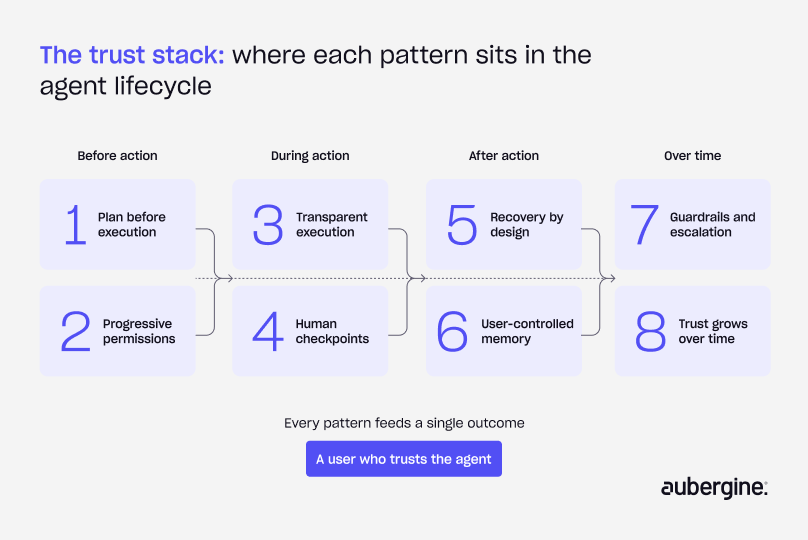
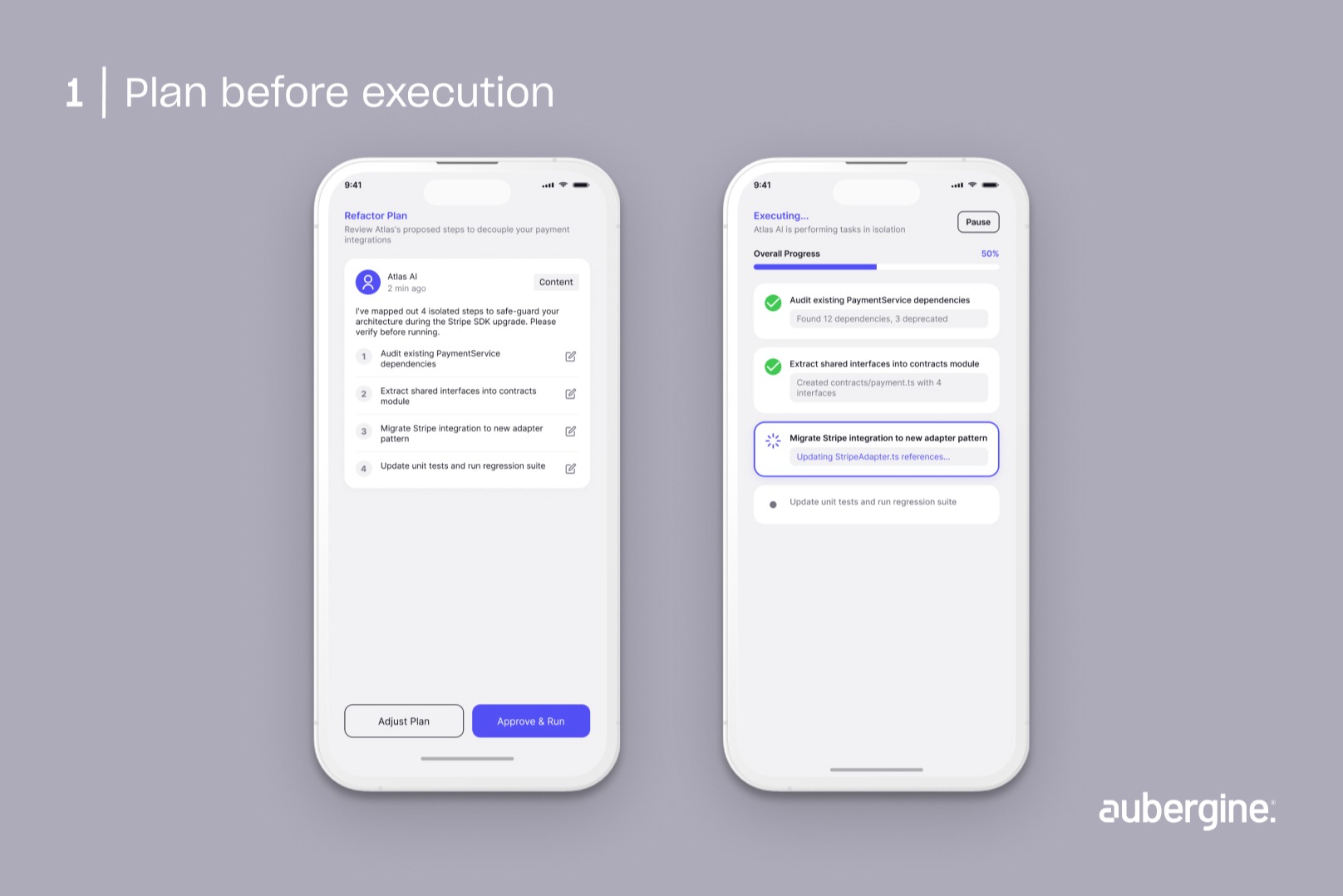
Pattern 1: Show the plan before the agent acts
The problem: an agent that jumps straight into execution is asking the user to trust a black box. And if the outcome turns out wrong, there's no way to tell where things went off track.
The pattern: before it acts, the agent lays out what it's about to do, in what order, and why, and gives the user room to adjust that plan before execution actually starts.
Why it works: it turns an autonomous action into a collaborative one. The user isn't just reacting to a finished result. They're reviewing a proposal they can still shape.
Where we've seen it: coding agents like Devin break a request down into a visible task list before touching any code. That gives the developer a chance to catch a wrong assumption early, before it turns into wasted work.
Design considerations:
- Keep the plan short enough to scan in a few seconds. A ten-step plan nobody actually reads is no better than no plan at all.
- Let users edit the plan directly. Approve-or-reject-the-whole-thing isn't much of a choice
Pattern 2: Expand permissions gradually, not all at once
The problem: ask for broad system access on day one, and you're forcing users to trust the agent before it's done anything to earn it. Ask for approval on every tiny action instead, and people just learn to click "approve" without reading. Neither actually works.
The pattern: agents should start with a narrow, clearly scoped set of permissions, and only earn broader access once they've completed tasks successfully.
Why it works: it's just how trust works between people, too. Nobody hands a new hire the master key on their first day.
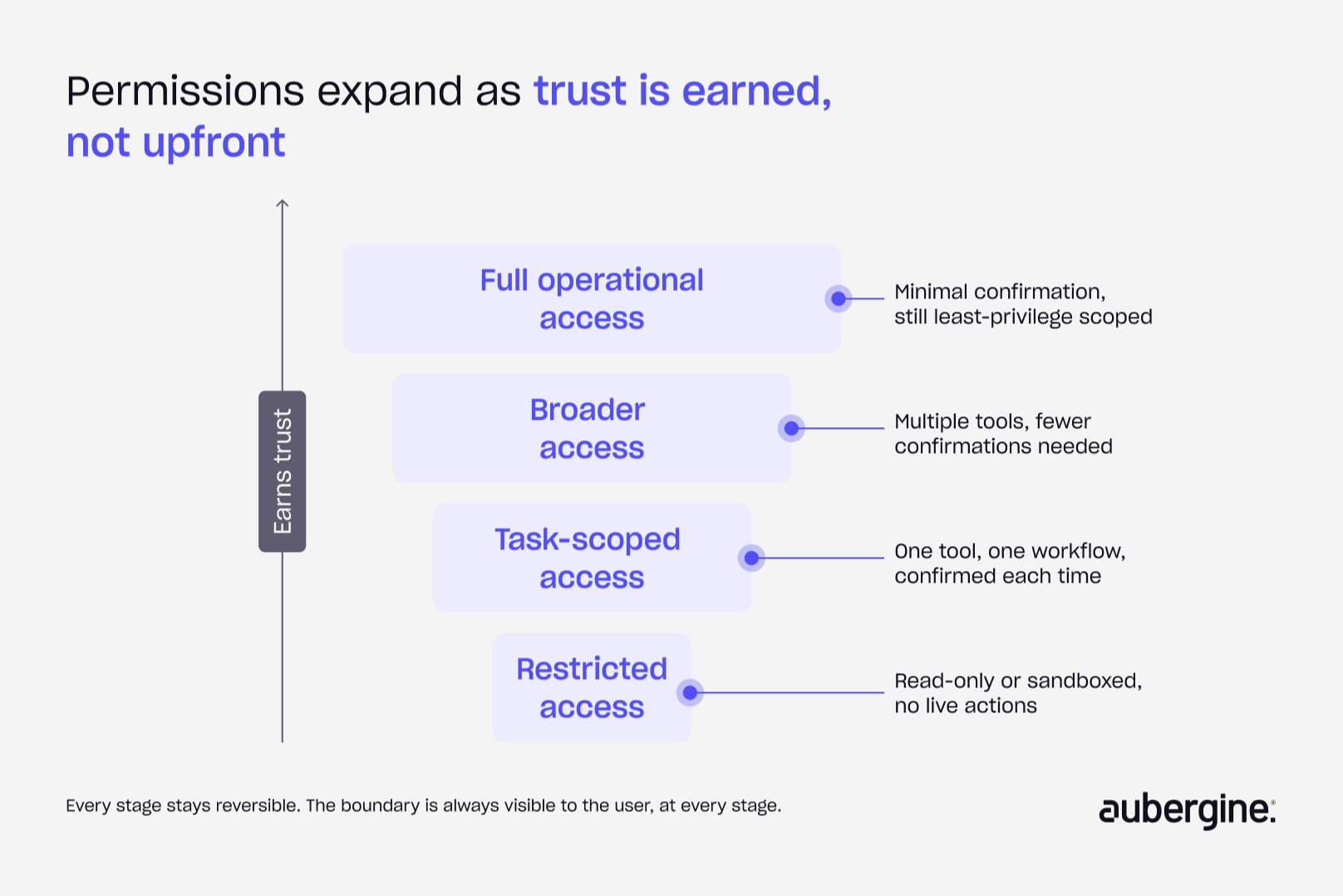
Where we've seen it: Claude's computer use capability and OpenAI's agent permission models both default to constrained, task-specific access rather than open-ended system control.
Design considerations:
- Make the current permission boundary visible at all times.
- If a user doesn't know what an agent can't do, they'll assume it can do anything, and that assumption does more damage to trust than a narrow boundary ever would.
Pattern 3: Make execution visible while it's happening
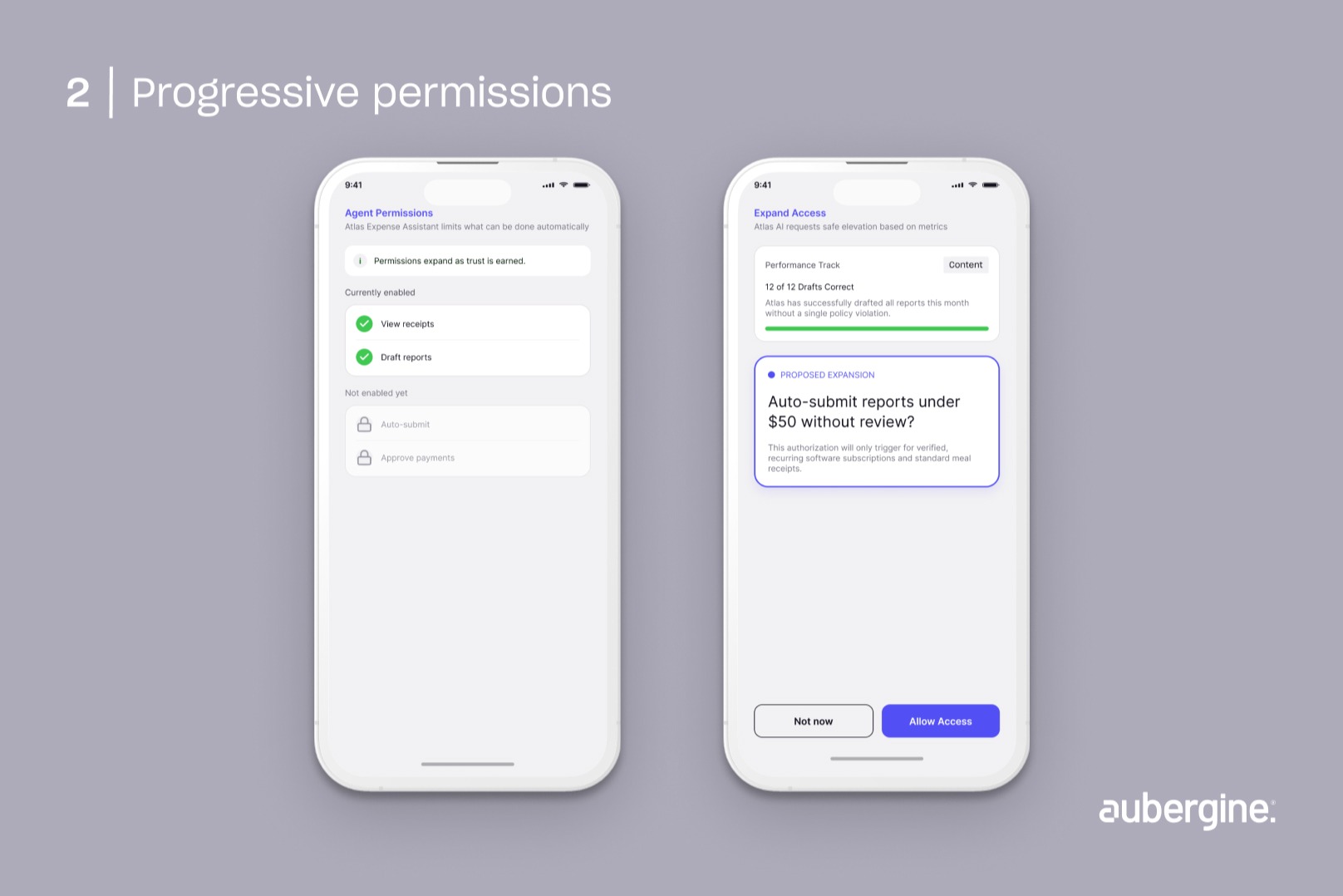
The problem: a spinner that hides ten minutes of tool calls, searches, and decisions leaves the user with nothing to evaluate except the final output. And if that output turns out wrong, good luck figuring out why.
The pattern: show the current step, the tool being used, and progress toward completion in real time, instead of only revealing the finished result.
Why it works: users build calibrated trust by watching how an agent works, not just by reading what it produced. A visible reasoning trail also gives them a natural point to step in before a small error snowballs into a bigger one.
Where we've seen it: Replit Agent and Perplexity both show a live trail of what's happening, files being edited, sources being checked, instead of a blank loading state.
Design considerations:
- Transparency has a ceiling. Past a certain point, a step-by-step log turns into noise the user just tunes out.
- Summarize instead of dumping raw logs.
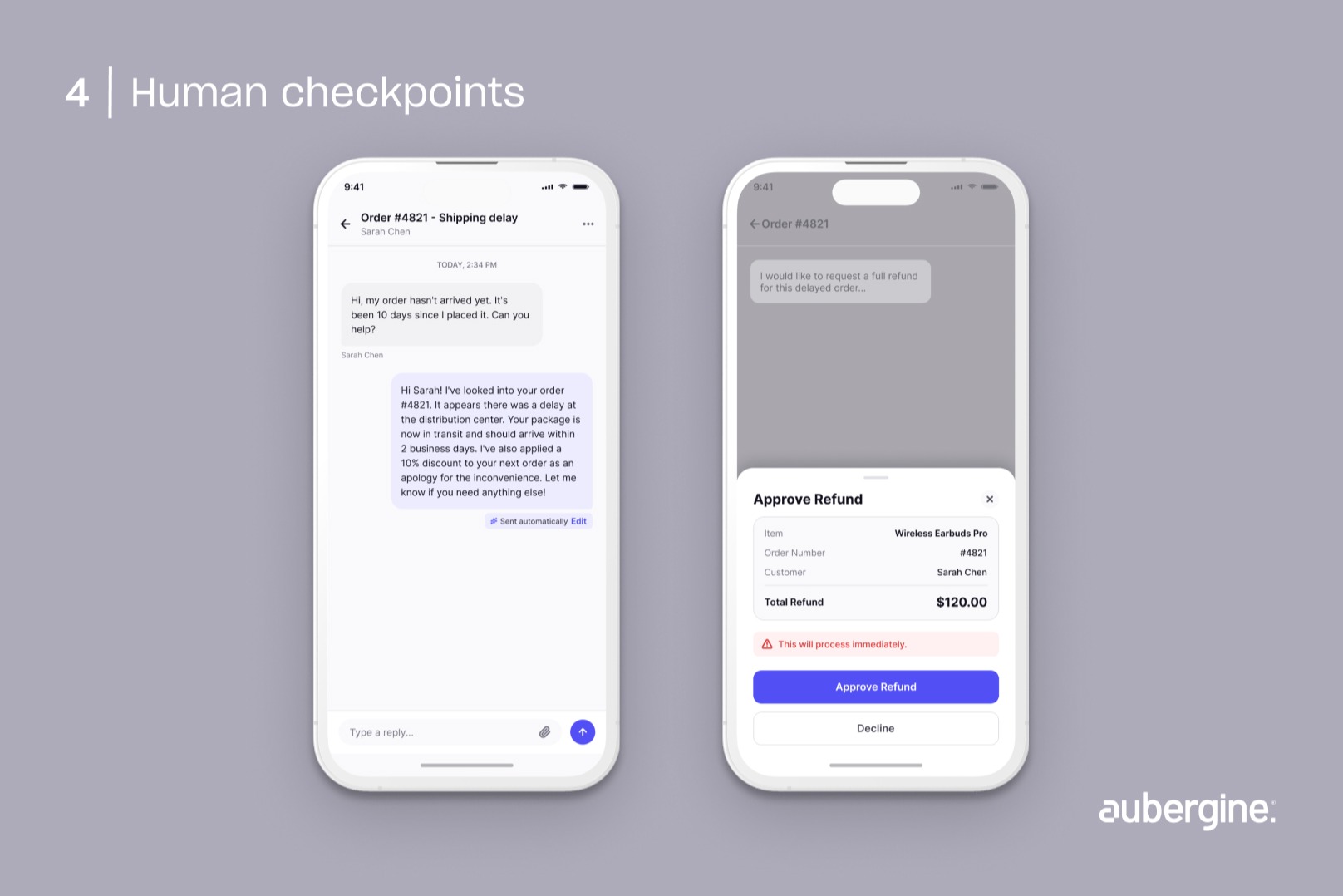
Pattern 4: Put a human in the loop for high-stakes decisions
The problem: require approval for every single action, and users start rubber-stamping requests without reading them. Require it for nothing, and the safety net disappears exactly where it matters most.
The pattern: build human-in-the-loop checkpoints around the risk and reversibility of the action, not around how often the agent acts.
Action type
Human in the loop checkpoint needed?
Internal drafting or brainstorming
No
Customer-facing summary or reply
Optional, confidence-based
Refund, purchase, or account change
Yes
Production deployment
Yes
Why it works: it puts human attention where a mistake actually costs something, instead of spreading it thin across low-stakes actions where a mistake is trivial to fix anyway.
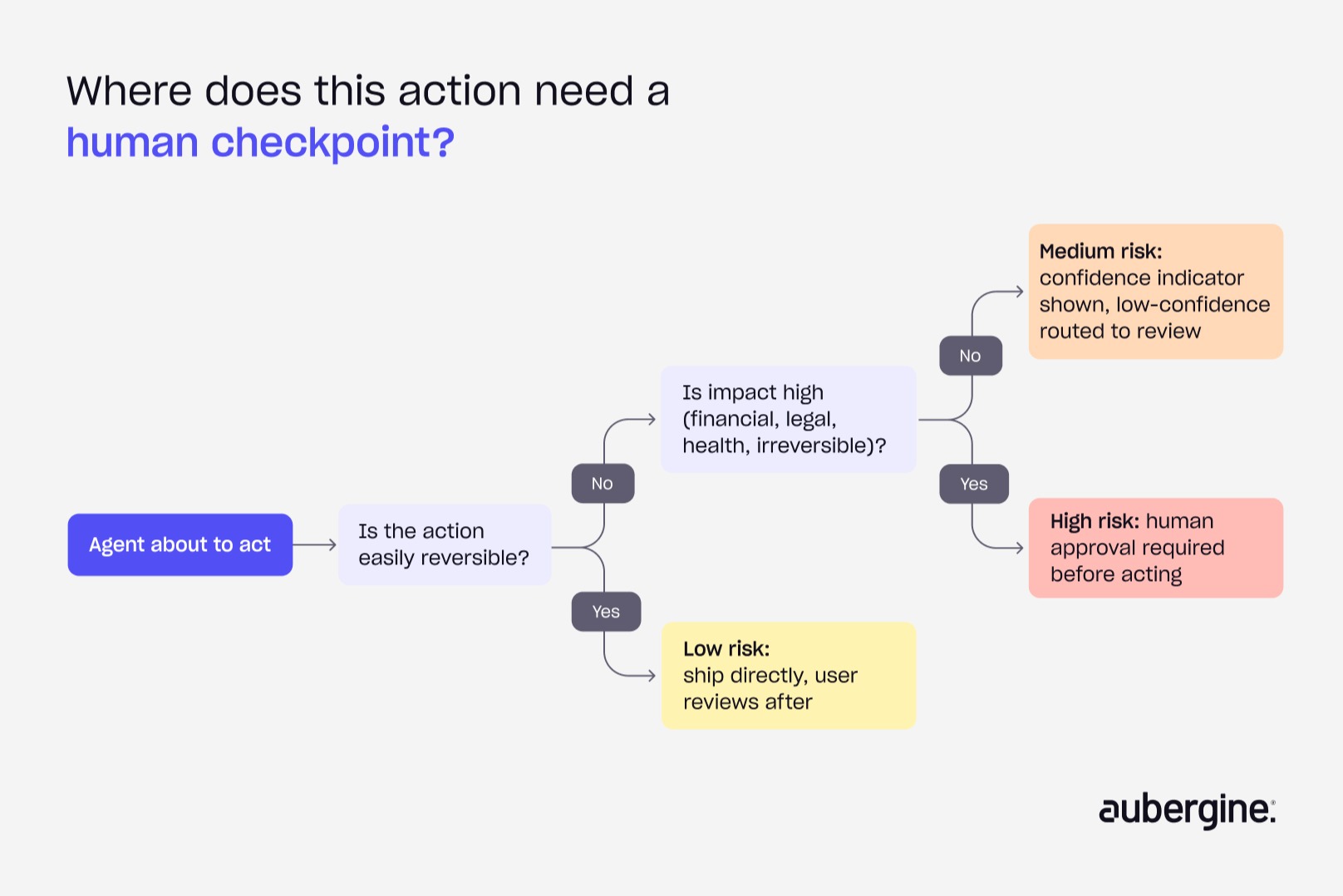
Where we've seen it: purchase confirmations, refund approvals, and deployment gates across enterprise AI tools consistently land at this exact risk threshold, not at some fixed step count.
Design considerations: define the risk tiers explicitly, in writing. This is a product decision, not something to leave to individual engineers making the call one at a time.
Pattern 5: Design for recovery before you design for automation
The problem: teams tend to design the happy path of an autonomous action in a lot of detail, then treat failure as an edge case they'll get to later. In production, failure is never just an edge case.
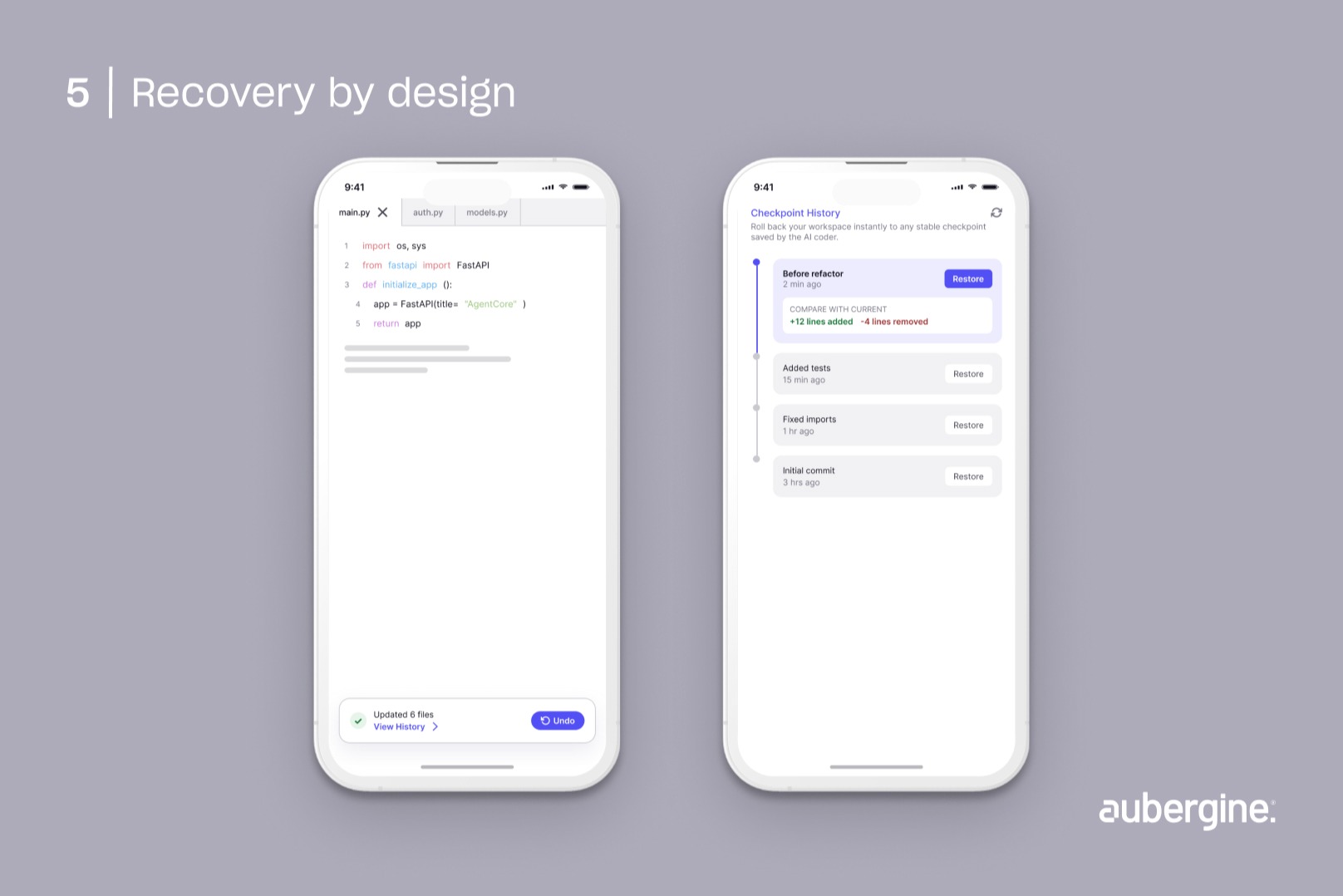
The pattern: build undo, rollback, checkpoints, and version history into the agent's actions from day one, so a wrong action turns into a recoverable inconvenience instead of a crisis.
Why it works: a real safety net changes how willing users are to let an agent act with any autonomy at all. Recovery options don't just fix mistakes after the fact. They lower the psychological cost of granting autonomy in the first place.
Where we've seen it: Cursor and Replit Agent both build checkpoint and rollback mechanics directly into the coding workflow, so a bad agent-generated change is one click from reverted.
Design considerations: recovery needs to be as fast and obvious as the original action was. A rollback buried three menus deep doesn't work as a safety net in practice, no matter how good it looks on a spec sheet.
Pattern 6: Give users visibility and control over what the agent remembers
The problem: memory makes an agent more useful the longer you use it, but invisible memory just reads as surveillance. Users who don't know what's being retained, or why, tend to trust the agent less over time, which is the exact opposite of what memory was supposed to do.
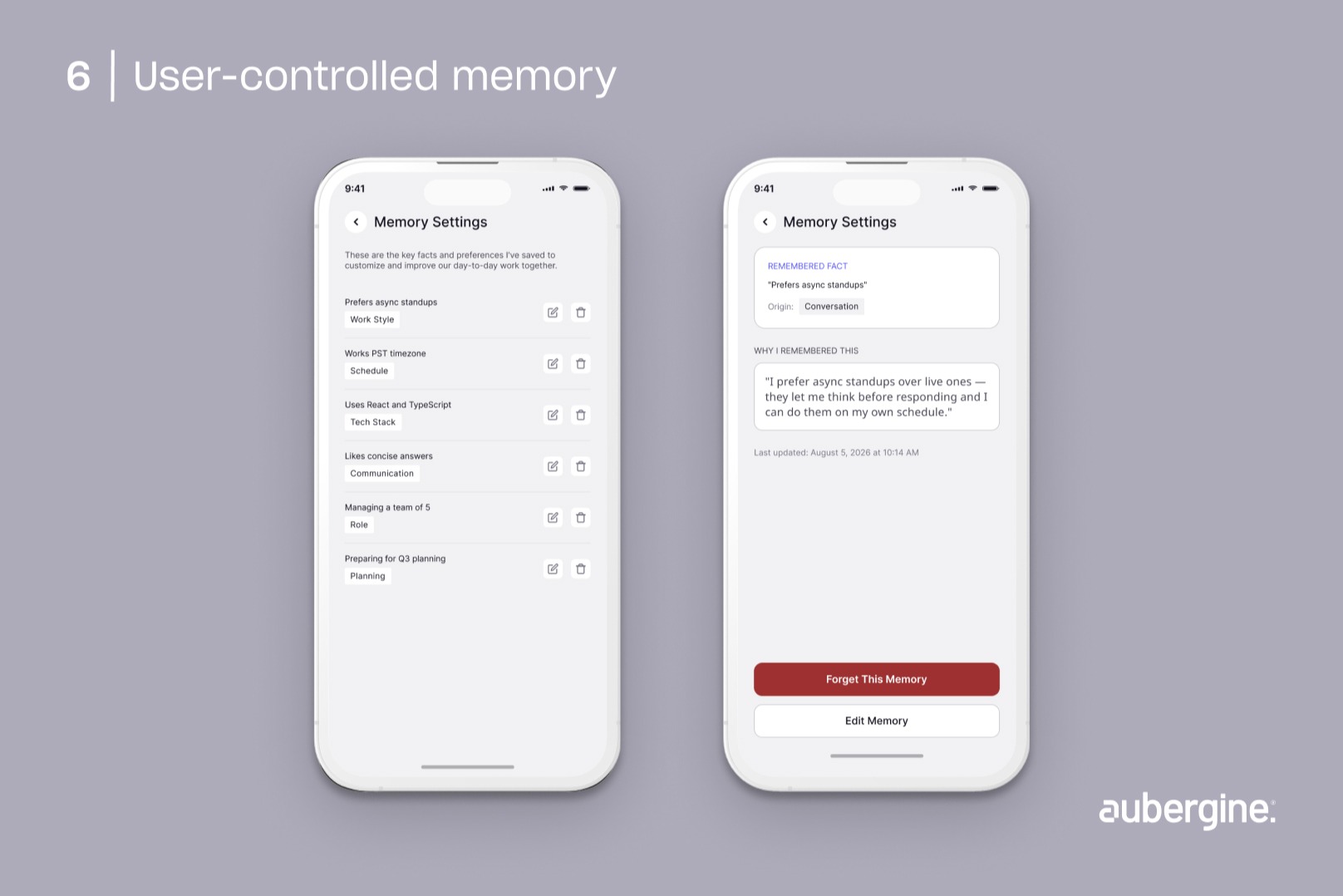
The pattern: show users what the agent has stored, why it stored it, and give them a direct way to edit or delete it.
Why it works: control over memory turns a vague unease, that "what does it actually know about me" feeling, into a concrete question the user can go check whenever they want.
Where we've seen it: Notion's agent features surface memory as an editable, inspectable layer instead of a hidden backend process.
Design considerations: default to transparency instead of a settings page nobody visits. If checking what's remembered takes more effort than most people are willing to spend, the control might as well not exist.
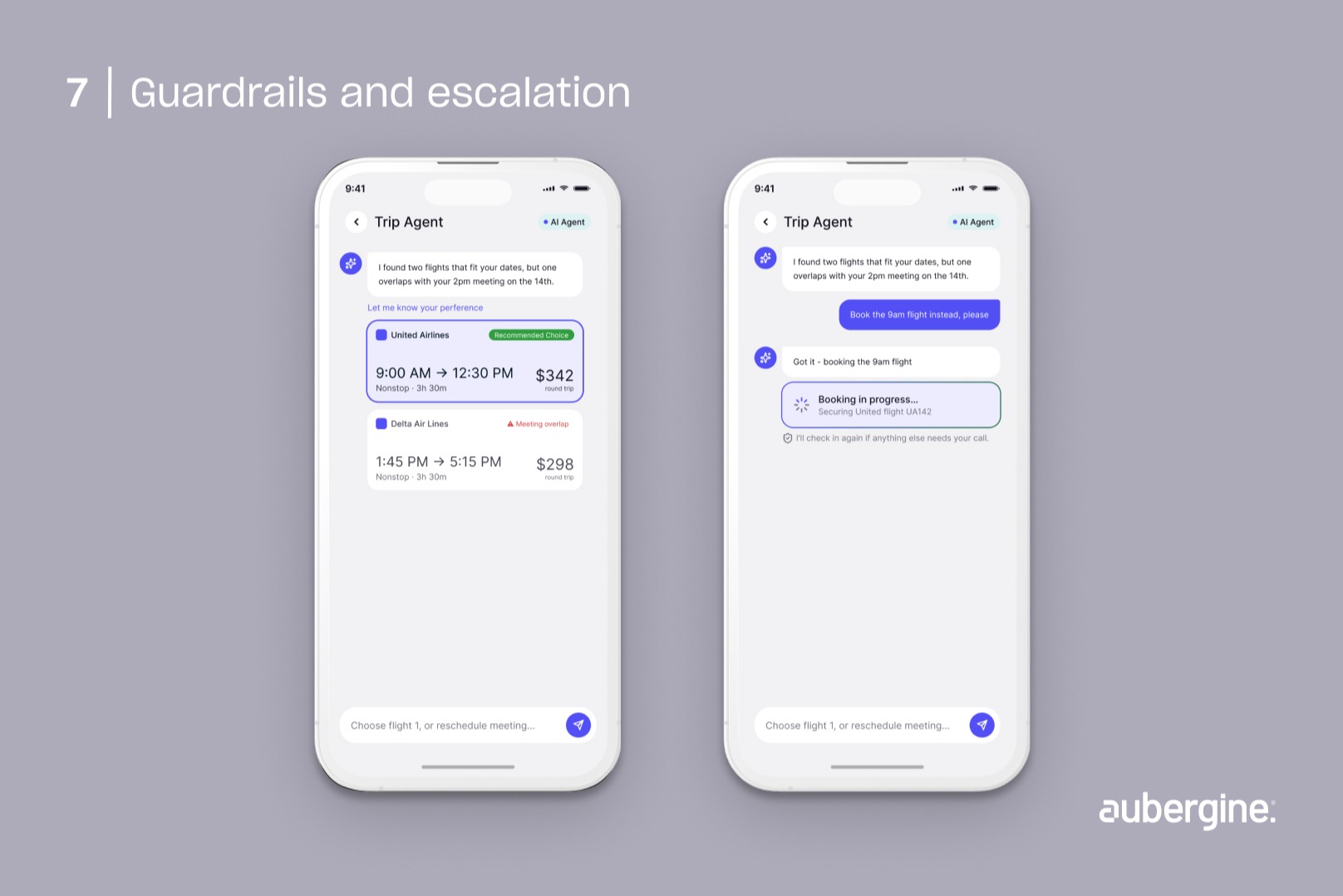
Pattern 7: Let the agent escalate instead of guessing
The problem: an agent that pushes forward past the edge of its own confidence, instead of admitting it's unsure, causes the failures that damage trust the most. The user finds out after the fact, not during.
The pattern: build explicit thresholds where the agent stops and hands the decision to a human, and frame that as a confident, expected part of the workflow, not a malfunction.
Why it works: an agent that says "I'm not confident enough to proceed here" ends up more trustworthy over time than one that always produces an answer. Users learn they can actually rely on the escalation itself as a signal.
Where we've seen it: OpenAI's published agent guidance treats policy-based intervention and human handoff as a designed feature of the system, not a fallback bolted on afterward.
Design considerations: make the escalation message specific about what triggered it. A generic "something went wrong" undoes the exact confidence this pattern is supposed to build.
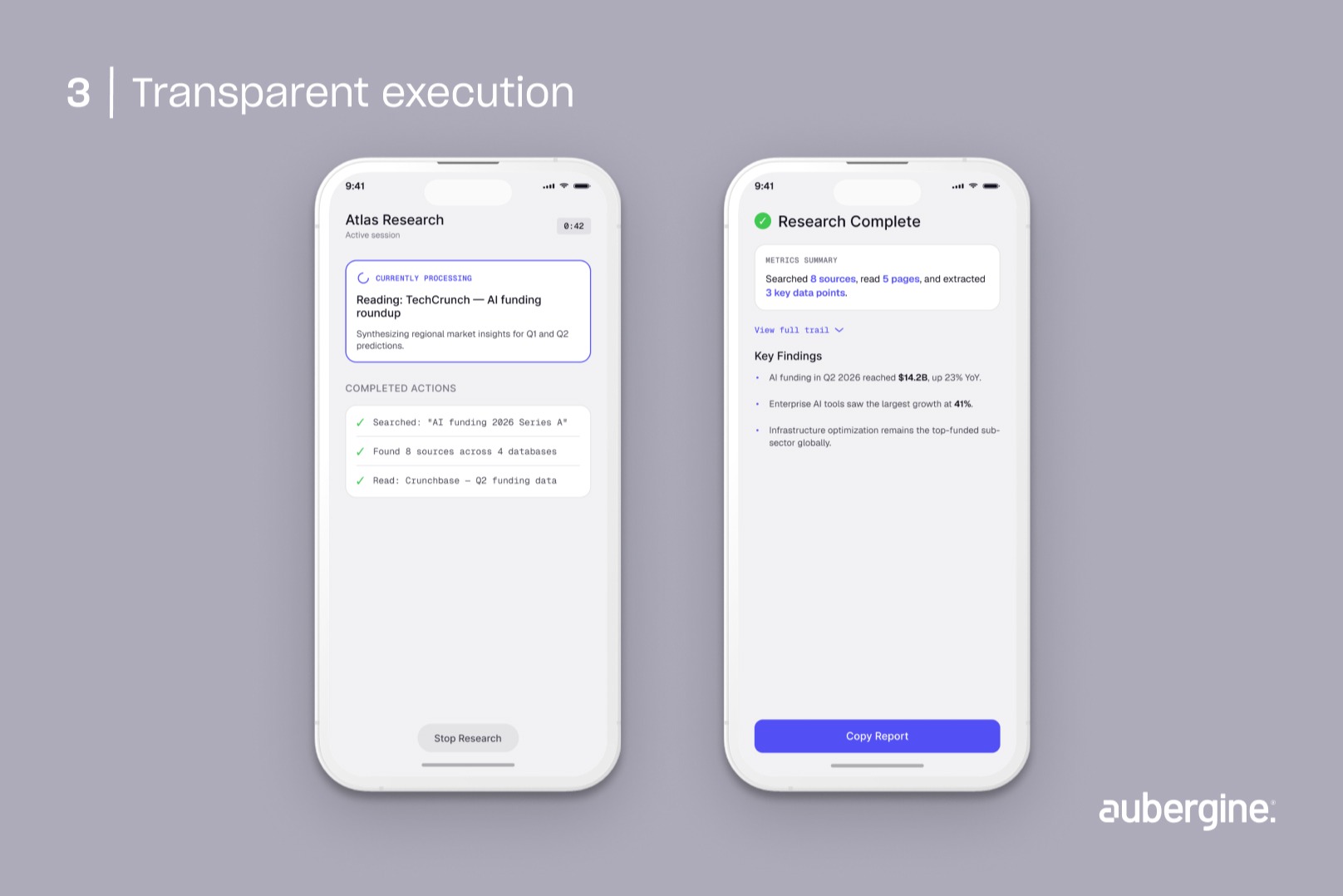
Pattern 8: Let autonomy expand only as trust is earned
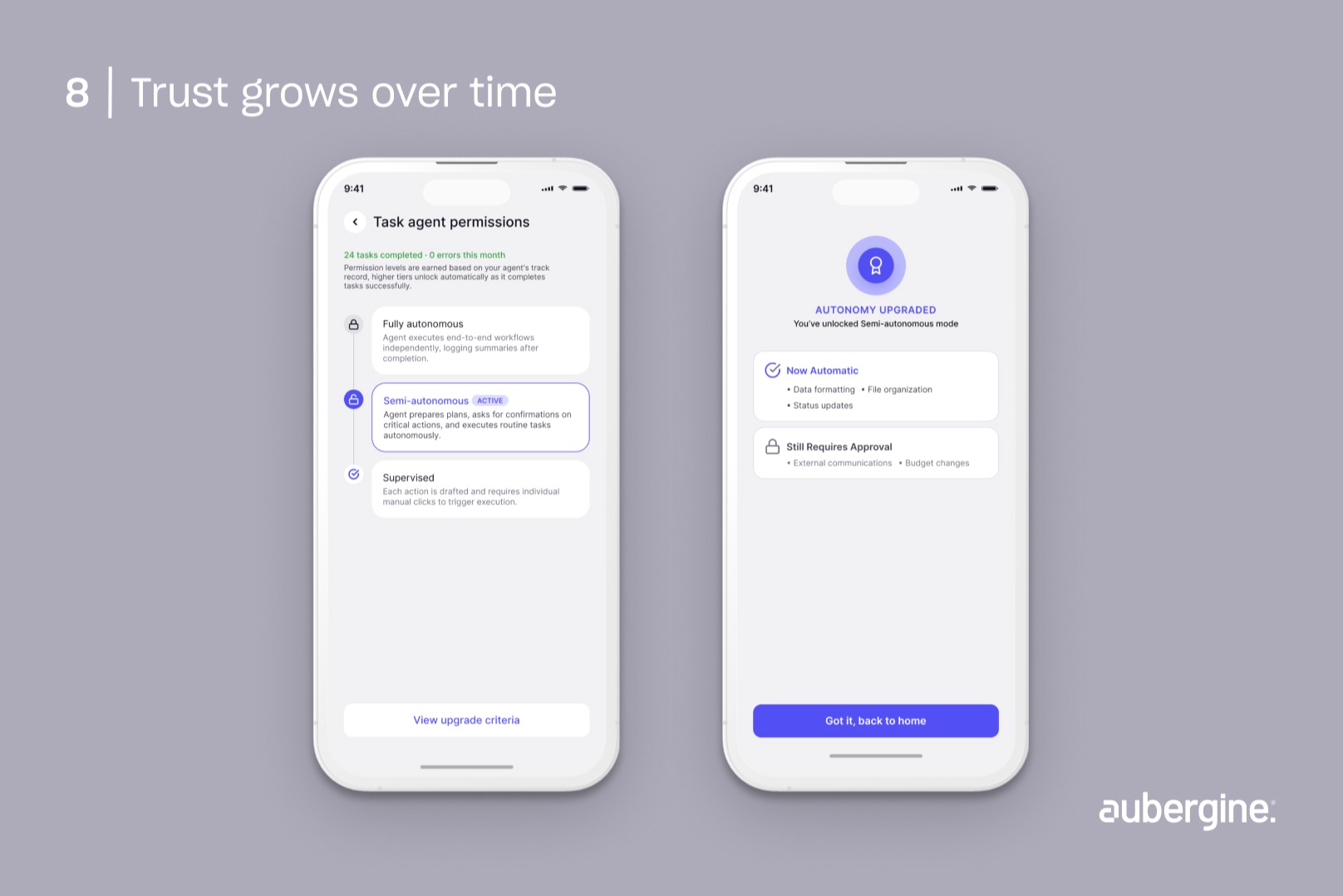
The problem: teams sometimes try to patch trust issues by piling on more transparency features, when the real issue is that the system's autonomy level hasn't been earned yet.
The pattern: treat autonomy as something an agent earns incrementally, tied to a visible track record of successful interactions, the same way a new employee climbs from closely supervised to increasingly independent.
Why it works: this is the pattern that holds all the others together. Planning, permissions, transparency, recovery, and escalation aren't separate features doing separate jobs. They're how trust actually gets earned at each rung of that ladder.
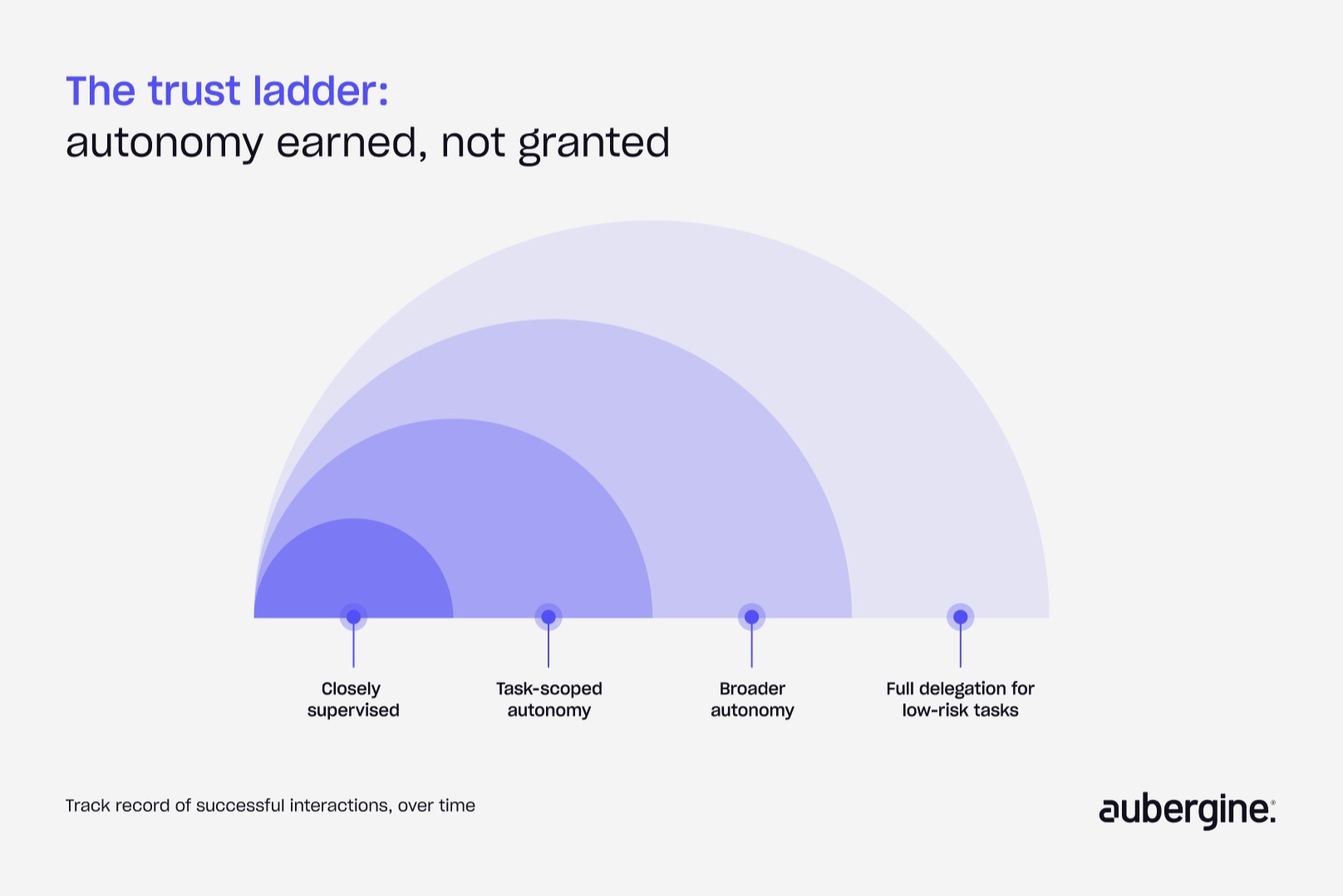
Design considerations: make the ladder visible to the user in some form, even informally. Someone who can see that the agent has earned more autonomy over time will trust that expansion far more than someone who's just told the system got an update.
Building this into your UX design process
None of these eight patterns do much on their own. An agent with a beautiful execution timeline but no way to recover from a mistake is still one bad action away from losing a user's trust completely. An agent with tightly scoped permissions but a hidden reasoning process still feels like a black box. The patterns work because they compound, which means they need to be part of the UX design process from the first prototype, not a trust layer bolted on after the core feature ships.
This is also where most teams underestimate the actual work involved. It's tempting to treat trust patterns as a polish pass you do at the end of a sprint. In practice, they shape core architecture decisions: what gets logged, what's reversible, what needs a checkpoint. Those decisions get expensive to unwind later if you didn't make them upfront. We've written before about why AI alone won't fix product execution, and the same idea applies here: the model is rarely the constraint. The system you build around it is.
The one thing worth remembering
Trust in an AI agent isn't a feature you bolt on. It's what you get when a user can see what the agent is doing, stop it if they need to, understand why it acted the way it did, and recover cleanly if something went wrong. Get that right, and autonomy stops feeling like a risk and starts feeling like leverage.
If you're building an agentic product and want a second opinion on where your interface might be quietly asking users for more trust than it's earned, that's worth a conversation before your next sprint, not after a bad rollout.
Ready to build AI agents users actually trust? Let's talk.
FAQs
How is designing for an AI agent different from designing a regular software feature?

A regular feature responds to input in predictable ways, so the interface mostly needs to communicate state. An AI agent makes its own decisions about how to complete a task, so the interface also has to communicate intent, reasoning, and confidence — information a traditional feature never needed to expose.
Does adding human-in-the-loop checkpoints slow down AI adoption inside a company?
Not if the checkpoints are scoped correctly. Checkpoints on every action slow adoption because they create approval fatigue. Checkpoints scoped to genuinely high-risk, hard-to-reverse actions tend to speed up adoption, because they give risk-averse stakeholders a concrete reason to say yes.
Can these UX patterns work for a simple chatbot, or are they only for fully autonomous agents?
Some apply even to a basic chatbot — visible reasoning and user-controlled memory are useful at almost any autonomy level. Others, like progressive permissions and recovery by design, only become necessary once the system starts taking actions with real consequences rather than just generating text.
What's the fastest pattern to implement if we're starting from zero?
Transparent execution and recovery by design tend to have the best ratio of effort to trust gained. Showing what the agent is doing and giving users an undo option are both achievable without redesigning the agent's core logic, and both directly address the two most common causes of lost trust.
How do you measure whether these patterns are actually working?
Track escalation rate, override rate, and how often users manually undo an agent's action. A high override or undo rate usually points to a permissions or planning problem, not a model problem. A dropping escalation rate over time, alongside stable output quality, is a decent proxy for the "trust ladder" pattern working as intended.
Do these patterns apply outside of coding and productivity tools, like customer-facing products?
Yes, and arguably more so. Customer-facing agents dealing with refunds, bookings, or account changes carry higher reputational and financial risk per mistake, which makes checkpoints, recovery, and clear escalation paths less of a nice-to-have and more of a baseline requirement.


Authors

Rupali Saini

More ways to listen


Podcast Transcript