
What loop engineering looks like when the output is design
Ask a product team how they use AI in design today, and most describe the same handful of moves:
- Drafting UX copy
- Critiquing a screen
- Suggesting a layout
- Reviewing accessibility
- Summarizing research
Each of these is a single request answered by a single response. The designer asks, the model answers, and the exchange ends there, only to restart the next time someone has a question.
This was pretty much how our team was using AI in design, until we stumbled onto something interesting.
The moment it stopped looking like prompting
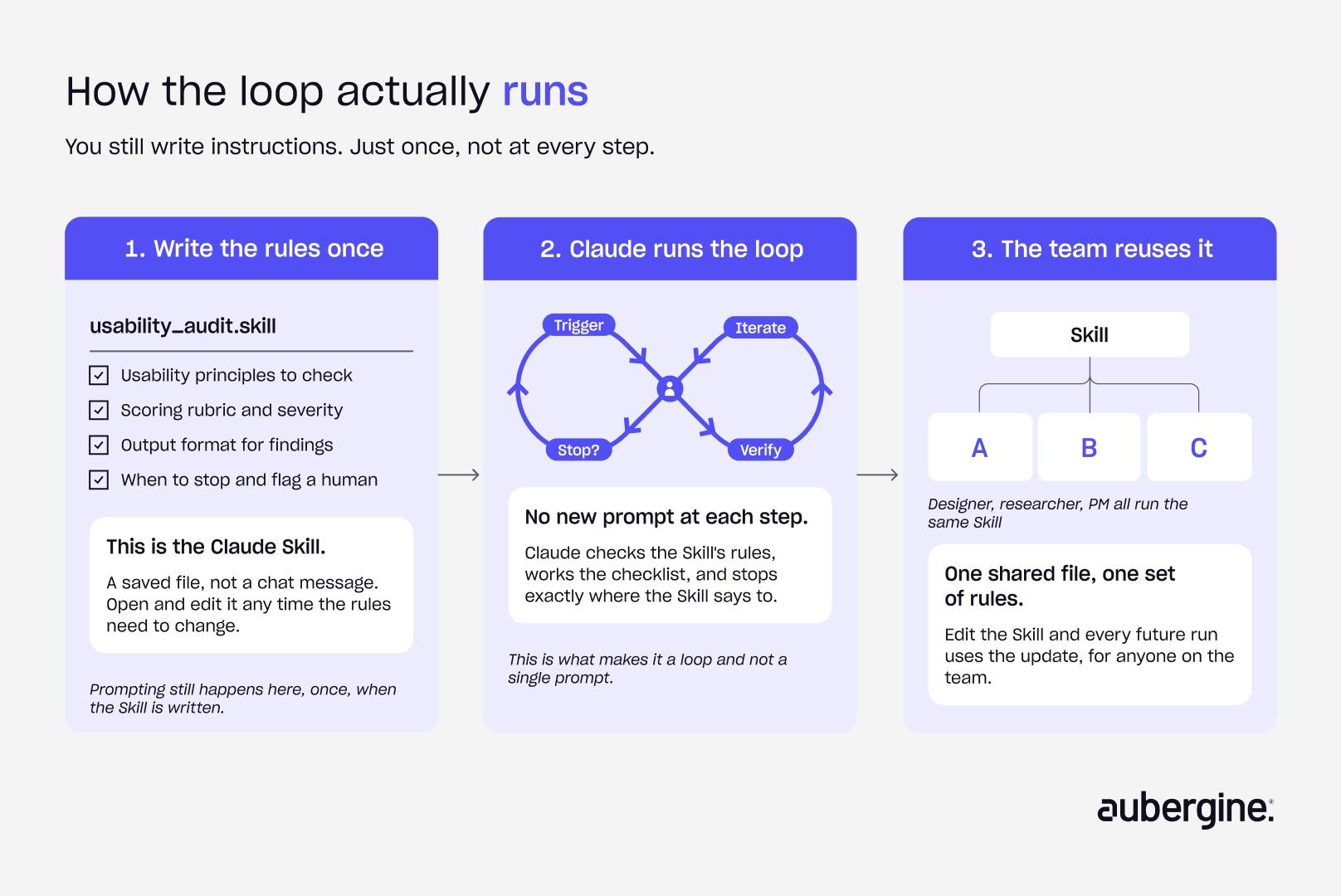
While building a Claude Skill for usability audits, something in the workflow started behaving differently. Instead of returning one answer, Claude worked through a checklist step by step: reviewing a screen against a defined set of usability principles, scoring it, flagging issues, and moving to the next item without needing a fresh prompt at every stage.
The output wasn't a single response. It was a process running to completion, with a person reviewing the result and stepping in only when something looked wrong.
What loop engineering actually means
Prompt engineering is about writing a better single request. Once a system starts repeatedly evaluating and improving its own output, that's something else entirely. Software teams already have a name for it: loop engineering.
The term was coined by Google Chrome Engineering Lead Addy Osmani. He was inspired by Boris Cherny, head of Claude Code, who noted, “I don’t prompt Claude anymore. I have loops running that prompt Claude and figuring out what to do. My job is to write loops.”
In engineering terms, loop engineering means designing the boundaries of that process:
- What starts the loop
- What the AI can access
- What it's allowed to change
- How progress gets recorded
- How results are verified
- When a human has to step in and review
In design terms, it means something a little different. Building Claude Skills for workflows like usability audits, we weren't just writing prompts. We were designing how the AI should think, review, iterate, and eventually hand the decision back to a person. That's loop engineering for design: structuring an AI workflow around when it begins, what design context it draws on, how it evaluates quality, what it carries forward between iterations, and when it stops so a designer can make the final call.
Not a Claude-only idea
Claude didn't invent loop engineering. It made it visible.
This article uses Claude as the running example because Skills, tool use, and step-by-step execution make the process unusually easy to observe from the outside. The underlying principles aren't specific to Claude, though. They apply to any AI system capable of running iterative workflows, holding context across steps, calling external tools, and checking its own output along the way.
From prompt engineering to loop engineering: how AI in design should actually work
AI in UX and AI in design work shows up in fairly predictable places today:
- Generating UX copy
- Critiquing an interface
- Suggesting layout options
- Reviewing accessibility
- Summarizing research
Most of what gets marketed as an AI design assistant is built for exactly this kind of single-shot interaction: ask, get an answer, ask again. Each of these interactions asks a person to supply context and decide what happens next. That's fine for a single task. It breaks down the moment a workflow needs to run the same evaluation repeatedly, on a schedule or a trigger, without a person re-explaining the rules every time.
Software development solved a version of this problem years ago. A code change runs through a loop: change, test, pass or fail, correction, repeat. Adoption of AI across design work has moved fast enough to make this comparison worth taking seriously. 91% of designers now use AI at least weekly, up sharply from just over half the year before,¹ and three in four use it daily.¹ While speed is the clear payoff: 78% of design professionals say AI tools noticeably speed up their workflow.² Confidence in the output hasn't kept pace. Only 58% say the same tools improve the quality of their work,² and unreliable output quality is the single most common complaint designers raise about working with AI.³
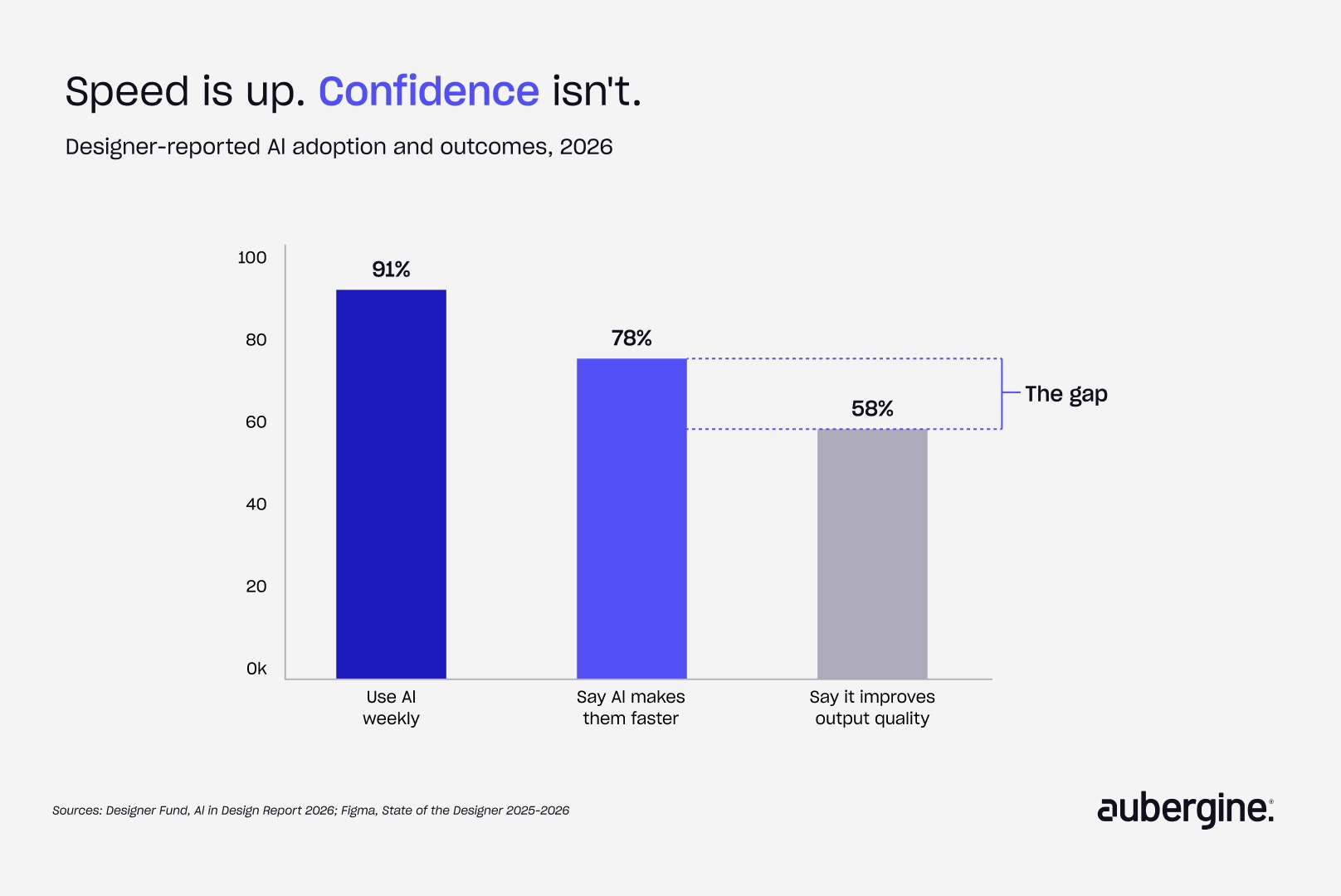
That gap between speed and confidence is exactly where a loop earns its place. Software's loop works because pass or fail is usually a clean, testable outcome. Design has no equivalent compiler. Usability, accessibility, brand consistency, and business goals rarely reduce to a single number, and human judgment stays in the loop by necessity, not habit. So the real question isn't whether design can borrow the loop from engineering. It's what has to change about the loop once the thing being evaluated is a design.
Where Claude Design fits into a bigger AI design assistant landscape
The tools themselves are moving in a related but different direction. What started as single-purpose AI design assistant features bolted onto existing software has expanded into standalone workspaces built to generate more per request. Claude Design, Anthropic's own AI design workspace, produces complete prototypes, decks, and marketing assets in a single pass instead of one suggestion for one screen. However, this solves a different problem than what we’re talking about. Loop engineering isn't asking how much a single request can produce. It's asking how a system evaluates and improves its own output across many requests, without a person re-triggering it every time.
The four parts of a design loop
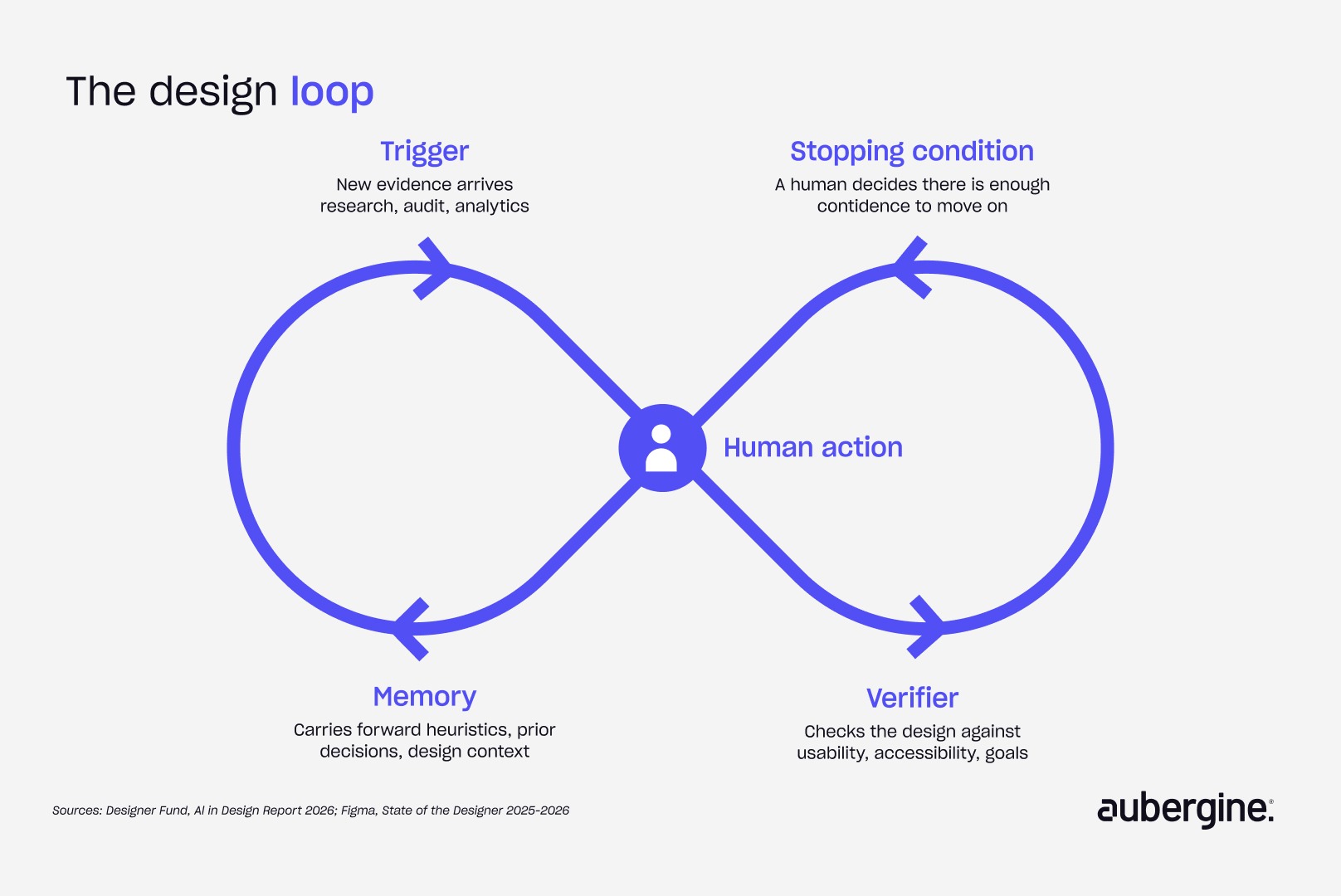
A working loop, in software or in design, needs four things: something that starts it, something that checks the output, something that carries context forward, and something that tells it when to stop.
1. Trigger
A software loop usually starts after a code change. A design loop starts when new evidence changes what the team believes. That could be:
- A failed usability test
- Fresh interview findings
- An accessibility review
- A shift in business priorities
- A colleague questioning an interaction pattern
In the usability audit skill, the trigger wasn't a Figma file landing in a folder. It was the decision to check designs consistently against Aubergine's usability framework, rather than review them whenever someone remembered to.
2. Verifier
This is where design and engineering diverge the most. Engineering asks whether the code works. Design has to ask whether the experience is right, and that question rarely has a binary answer. A design verifier might weigh:
- Usability
- Accessibility
- Design system consistency
- Product goals
And often, it has to consider all of these at the same time. When running the usability audit skill, the goal was never to get Claude to declare a screen "correct." It was to evaluate the screen against a consistent framework and surface what a reviewer needed to look at next. The verifier produces a structured judgment call, not a pass-or-fail flag.
3. Memory
This turned out to matter more than any individual prompt. A usability audit needs to carry forward:
- Aubergine's own heuristics
- Relevant Nielsen Norman principles
- Severity scoring conventions
- Prior findings
A design system audit needs a different kind of memory: component behavior, token definitions, naming conventions, and decisions the team has already made and doesn't want to re-litigate every time. Without that memory, every audit is an isolated opinion with no relationship to the last one. With it, each pass builds on what the team already knows.
4. Stopping condition
Software loops stop when tests pass. Design loops rarely get to declare victory that cleanly because there's no universal version of "all tests passed" for an experience.
A loop generating design tokens, for example, can keep comparing new variables against existing ones and proposing fixes until it reaches internal consistency. But consistency isn't the same as good design. Someone still has to decide whether a new abstraction actually makes sense or just adds another layer nobody asked for.
The loop should stop exactly where that judgment call becomes necessary, not because the AI failed, but because that's the point where a human is the only one qualified to answer.
How design loops are different from software loops
The structure looks similar on paper, but copying a software workflow directly into design doesn't work.
Three places this shows up in a real design practice
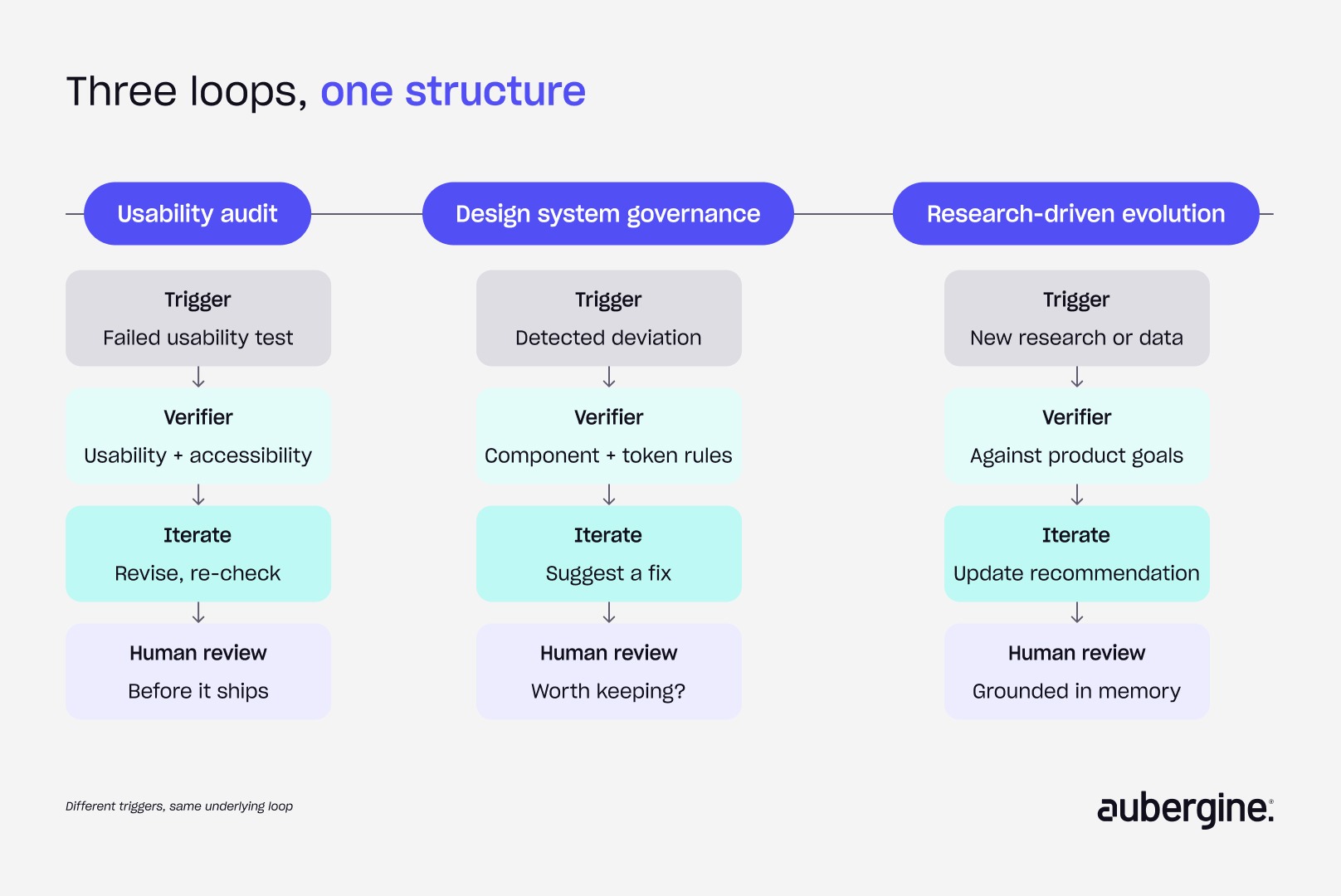
Three scenarios cover most of where loop engineering earns its place in a product team's day-to-day work.
Usability audits
A usability study shows users consistently stumbling on the same workflow. The loop runs: research finding triggers a review, the existing design gets evaluated against usability and accessibility criteria, Claude proposes revisions, the revisions get re-checked, and a human reviews the result before it ships. This is the scenario that surfaced the whole idea, because encoding the review process itself, rather than re-prompting for each check, is what turned individual critiques into a loop.
Design system governance
A design system team notices growing inconsistency across squads. The loop detects a deviation, checks it against component standards, verifies accessibility, compares it to existing tokens, and suggests a fix, before a designer decides whether the fix is worth keeping. It's the same kind of repeated validation Aubergine has seen pay off in other AI-driven workflow automation work, where the win came from encoding a repeatable process rather than answering the same question by hand every week.
Research-driven product evolution
Interviews, support tickets, and analytics accumulate continuously rather than arriving in one batch. New evidence becomes a recurring trigger instead of an isolated event, and memory keeps recommendations grounded in everything the team has learned so far, not just the most recent conversation.
Where loop engineering fits, and where it doesn't
Most conversations about AI in UX still assume a single request and a single output. Loop engineering assumes something narrower: that specific parts of a workflow should run as a self-checking process. Not every design task benefits from becoming a loop. It earns its place where the work is repetitive and the evaluation criteria are reasonably well defined:
- Usability audits
- Accessibility reviews
- Design system governance
- Research synthesis across multiple sources
- Quality checks against an established set of principles
It's the wrong tool where the value comes from open-ended exploration or a strategic call only a human can make, such as early concept work, brand direction, or deciding which problem is even worth solving. Loop engineering structures the repetitive parts of critique. It isn't a substitute for the parts of design that are supposed to stay unpredictable.
The designer's role doesn't disappear; it evolves.
The shift looks like this:
Before: designer prompts, AI responds, designer prompts again.
After: designer defines the system, AI evaluates and iterates within it, designer reviews and decides.
What stays firmly on the human side of that line:
- Defining the problem worth solving
- Setting the principles and constraints the verifier checks against
- Interpreting ambiguous or conflicting findings
- Making the strategic trade-off calls a rubric can't make
- Deciding when the work is actually ready to move forward
The stopping condition was never a technical checkbox. It's the point where human judgment was always going to decide, and building the loop around that fact, rather than around a fully automated review, is what makes it useful.
The takeaway
Loop engineering doesn't primarily optimize for speed. It optimizes for consistency, and speed usually shows up as a byproduct, not the goal itself. That shows up in a few concrete ways:
- Reduced context recreation. The workflow gets defined once instead of rewriting prompts and context for every audit.
- Improved consistency. Every review runs against the same framework, not however the prompt happened to be written that day.
- Lower cognitive overhead. Designers spend less effort remembering checklists and more effort interpreting findings.
- More repeatable outcomes. The same design gets evaluated against the same criteria every time, so reviews stay comparable across projects.
- Better scalability. As products, screens, or components grow, the review process scales without a matching increase in manual effort.
None of this replaces the designer. It removes the repetitive work around design, the re-prompting, context-setting, and structured checking, so more time goes to interpreting findings, making trade-offs, and deciding what a product should become.
If a team is running the same usability review, accessibility audit, or design system check by hand, over and over, that's exactly the kind of repetitive workflow where AI creates measurable ROI. Talk to Aubergine about auditing your workflows and building the AI systems, from a single Claude Skill to a full agentic experience, that make sense for your team.
FAQs
Is loop engineering just a new name for automation?

Not quite. A typical AI design assistant, or a basic automation script, runs a fixed sequence of steps the same way every time. A loop evaluates its own output against a set of criteria and decides what to do next based on the result, which means the path it takes can change from one run to the next depending on what it finds. The structure is closer to a review process than a script.
Do we need a custom-built AI system to try this, or can existing tools handle it?
Claude Skills are one practical way to encode a loop without building custom infrastructure: the evaluation criteria, source material, and sequence of steps get defined once, and the skill runs that process against new inputs going forward. Teams already comfortable with agentic tools can start there before considering anything more custom.
Does this replace design QA or design review meetings?
No. It changes what those meetings are for. Instead of spending review time on repetitive checks like whether a screen meets baseline accessibility standards, the loop handles that pass first, and the human review focuses on judgment calls the loop was never meant to make on its own.
How do you know the AI's evaluation of a design is actually reliable?
The verifier is only as good as the criteria it's checking against, which is why memory matters as much as the check itself. A verifier built on a team's actual heuristics, prior decisions, and design system rules produces judgments a reviewer can sanity-check and trust over time. One built on generic best practices with no organizational context is guessing, just more confidently.
What's a reasonable first workflow to try this on?
Usability audits and accessibility reviews are usually the easiest starting point, because the evaluation criteria already exist in most design teams, they just aren't consistently applied. Design system governance is a close second for teams that already maintain token and component documentation.
Is there a risk of over-automating design judgment?
Yes, if the stopping condition gets treated as optional. The entire premise of a design loop is that it hands the decision back to a human at a defined point rather than running to a conclusion nobody reviewed. Skipping that step turns a useful loop into an unsupervised one, which defeats the purpose.


Authors

Charvi Jain

More ways to listen


Podcast Transcript