
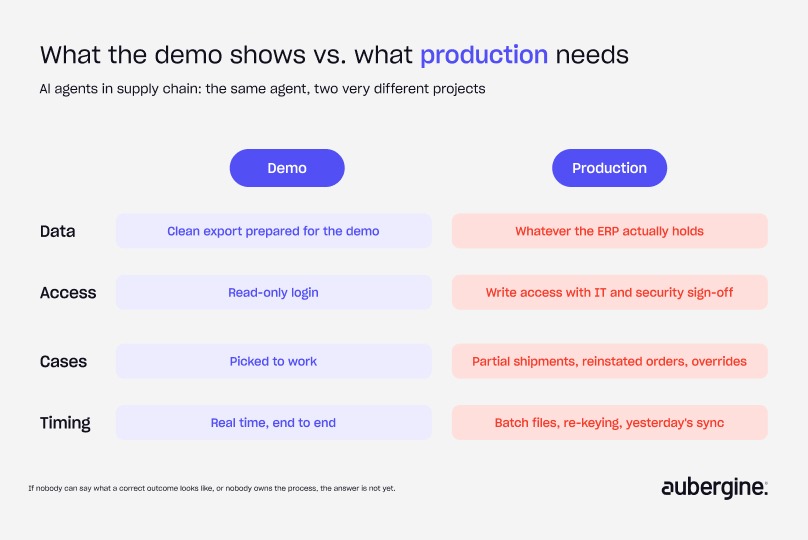
Most AI agent demos in supply chain look the same. The agent reads open orders, matches them against inventory, drafts the next step, and the room starts picturing it running across the business.
Look closer and the demo runs on a clean export someone prepared, through a read-only login. Production runs on whatever the ERP actually holds, and the agent needs permission to write back to it. That's where the real project starts.
My rough split, after building these: the agent is about 20% of the hours. The other 80% goes into everything around it:
- Connecting to the client's systems
- Approvals and the back-and-forth that comes with them
- Evaluation and training
- Getting the team to agree on what a correct answer looks like in production
Demos budget nothing for that 80%, which is why it surprises people.
Looking for our earlier overview of AI agents in supply chain and logistics? This blog replaces it. For where AI helps in the supply chain, see our guide to AI use cases in logistics and supply chain. This post covers what it takes to make an agent work inside the systems you already run.
The short answer: AI agents in supply chain and logistics succeed or stall on integration. Before you scope the agent, scope four things:
- Write access, and who approves it
- Data mapping across every system the agent touches
- The exceptions your team handles today
- How the agent hands work to legacy systems
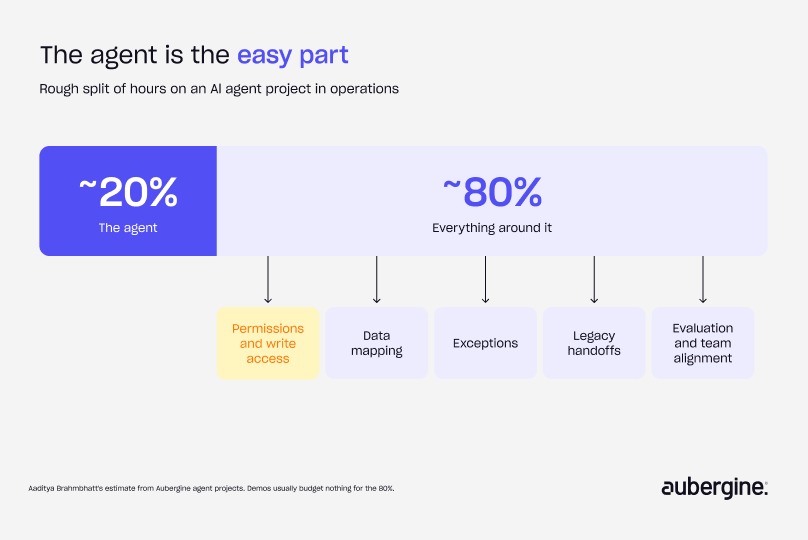
Where the 80% goes in AI agents for logistics and supply chain
Each part of the integration work has a different owner on the client side, which is why it takes calendar time as well as engineering time:
The agent itself needs none of these people. The project needs all of them.
Permissions: the demo reads, production writes
In the demo the agent reads. In production it has to write, and that's a different conversation. Reading needs a login. Writing needs sign-off from IT or security, a named owner on the client side, and a log of every action the agent takes.
None of this is hard technically. It takes calendar time, and nobody puts it on the plan. Our rule: scope write access before you scope the agent. If nobody can approve the agent writing to the system, you don't have a production project yet.
Data mapping is the job
The agent knows nothing about your data's quirks unless you map them. In supply chain, logistics and scheduling, the usual suspects are:
All of these are invisible in a demo built on a cleaned export. The mapping layer, a documented translation between how each system stores things and what the agent should understand, is where much of the 80% goes.
The exceptions your demo never saw
Demo data is picked to work. Production brings the cases your team handles from memory:
- Partial shipments: an order that arrives in three pieces over a week
- Cancelled, then reinstated: an order that changes state twice and leaves two histories
- Manual overrides: a change someone made directly in the ERP that the agent has no way of knowing about
Each one needs a decision before launch: does the agent handle it, flag it, or hand it to a person? Manual overrides deserve the most attention, because the agent will act confidently on data someone has already corrected elsewhere.
Ask your operations team for last month's exceptions. That list is a better scoping document than any feature spec.
Handoffs to legacy systems: where AI agents in logistics bite
The agent works in real time. The system it hands off to often doesn't. In practice, the handoff looks like one of these:
The failure lives in the gap between the agent and the system. Our blog on why AI agents fail covers handoffs as a general design problem. For ERP and legacy systems, design each handoff explicitly: the format, the timing, who checks it, and what happens when the receiving system rejects it.
A worked example: the form-filling agent and its checker
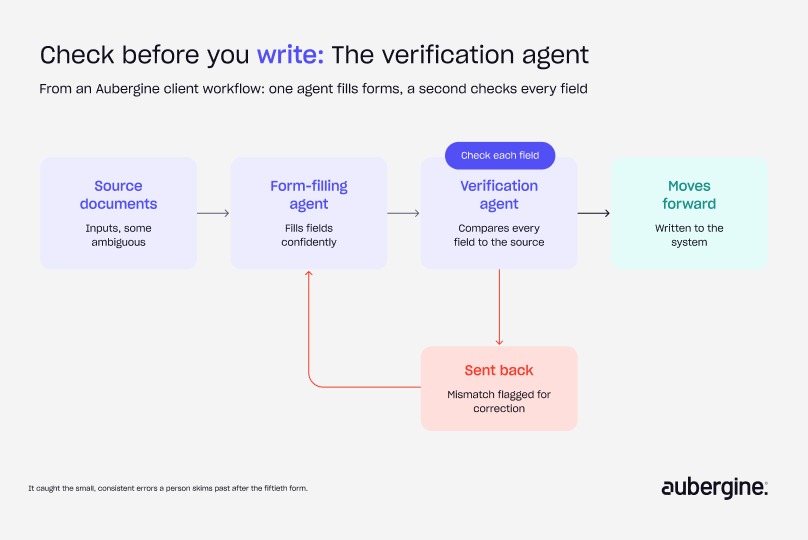
For one client, we built a workflow where an agent worked through a web interface and filled out forms, with a separate verification agent checking each result before it moved forward. Here's what each one did:
- The first agent filled fields confidently, even when the input was ambiguous
- The second agent had one job: check each field against the source and flag mismatches, sending failures back for correction
- What it caught: the small, consistent errors a person skims past after the fiftieth form
The lesson for supply chain is that the check belongs before the write. Once a wrong value lands in the ERP, it flows into planning, invoicing and reporting before anyone notices.
Roll out in phases that match the integration
The safest way to respect the 80% is to let the agent earn each level of access:
Each phase produces something useful on its own, and each one surfaces the next round of exceptions before the agent has the access to act on them.
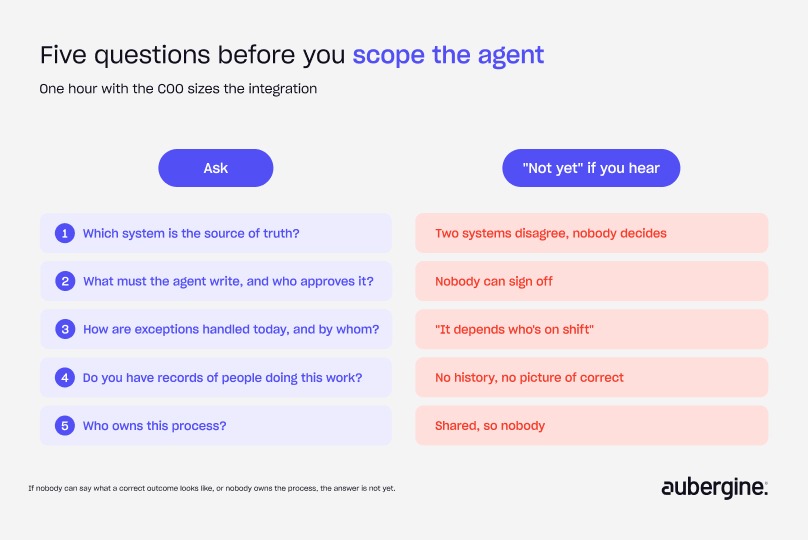
Scope the integration before the agent: five questions for the COO
If I had one hour with a COO before scoping any agent, these are the questions I'd ask:
If nobody can tell me what a correct outcome looks like, or nobody owns the process, my answer is not yet. Our blog on AI evals for AI agents covers how to build one.
"It plugs into your ERP in a week"
A week gets you a demo on read access with clean data. Ask the vendor three things:
- What happens on the first exception?
- Who approves the agent writing to our system?
- What will you test it against?
Then plan for the agent to be the small part of the project. If they can't answer, you've learned what the week was for.
For the CEO, in two sentences: the AI agent is about a fifth of the work, and connecting it safely to your ERP and legacy systems is the rest. Scope and budget the integration first, and the agent becomes the easy part.
Scope your integration before your agent
Take the five COO questions into your next planning meeting and answer them for one workflow. If you can't answer three of them, start there, before anyone builds an agent.
Aubergine's AI team scopes and builds enterprise AI integrations for operations teams, from write access and data mapping to the verification layer. If an agent demo is sitting on your desk, let's talk.
FAQs
How long does it take to integrate an AI agent with an ERP?

Longer than building the agent. The timeline depends on write-access approvals, how many systems are involved and the state of the data. In our projects, the agent is roughly 20% of the hours and integration work is the rest, so plan the schedule around the integration.
Can an AI agent work with read-only access to our ERP?
Yes, for recommendations, drafting and analysis, with a person acting on the output. It's a sensible first phase: you prove value before negotiating write access, and you learn which exceptions show up.
Do we need to clean all our data before deploying AI agents in supply chain?
No. Map the fields the agent touches for the one workflow you start with: units, IDs, statuses and time zones. A focused mapping layer beats a company-wide cleanup project that never finishes.
What should an AI agent do when it hits an exception it doesn't recognize?
Stop and hand it to a named person with the context attached, instead of guessing. We cover designing that hand-off in Teach your RAG support chatbot to say "I don't know".
Who should own an AI agent in operations?
A named operations owner who is accountable for outcomes, plus a technical owner for the integration. Shared ownership usually means problems sit unresolved between teams.
Are AI agents worth it for logistics if our systems are old?
Often, yes, as long as the handoff is designed honestly. Batch files or a person re-keying output can work for a first phase if the delay is acceptable for that workflow.


Authors

Aaditya Brahmbhatt

More ways to listen


Podcast Transcript