This summer, the model at the top of the leaderboards made our client's product worse.
We were building a long-running web and coding agent for a client. Claude Opus 5 had launched in July 2026 and was leading the public rankings, so upgrading looked like an easy call. Within days, users and our own team spotted a problem. Opus 5 kept ending its answers with a couple of open-ended questions, and users read those questions as a sign that the task they had started was incomplete. They kept checking back, and they were annoyed every time.
We rolled back to Opus 4.8 because it gave the answers the client expected. On another build around the same time, we picked Sonnet 4.6 over the newer Sonnet 5 for a similar reason: it communicated better for that product.
Neither decision makes sense from a leaderboard. Both made sense the moment we looked at how each model behaved on the client's own work.
The short answer: when comparing AI models for a business workflow, run each candidate against an evaluation set built from your own tasks, and decide with three numbers:
- The score a model must hit to ship
- The gain a new model must show before you switch
- The cost per completed task
In most workflows, the model is a choice you can reverse later. The test matters more than the pick.
Why leaderboard AI model comparisons miss what users notice
Leaderboards measure capability: can the model reason through a problem, write working code, recall a fact. Your users experience behavior: answer length, tone, whether it follows your format, whether it asks questions nobody wanted. Benchmarks rarely capture those habits, and users notice them first.
The model makers get caught by this too. In April 2025, OpenAI rolled back a GPT-4o update after users found it overly flattering and agreeable. In August 2025, OpenAI replaced GPT-4o with GPT-5 in ChatGPT, users protested, and GPT-4o came back within days. Sam Altman said that suddenly deprecating models people depended on in their workflows "was a mistake."
If the companies building the models can misjudge how a new version lands with their own users, a leaderboard won't predict how it lands with yours.
How to build an evaluation set from your own work
An evaluation set (often called a golden dataset) is a list of real tasks paired with the outcome you expect. We covered how we build one in our blog on AI evals for AI agents. For comparing AI models, three points matter most:
- Size it to the job: we use anywhere from 50 to 500 examples, depending on how many different things the agent is supposed to do
- Take the answers from people: the best answer key comes from real human interactions with no AI involved, checked against the expected output and cleaned of bias
- No history yet? Watch a person do it: for a new product, we evaluate how a human performs the task and use that as the bar
If people did this work before the AI arrived, your evaluation set is already sitting in your old tickets, emails and case notes.
For each task in the set, score more than the final answer:
Score behavior as well as correctness. In the Opus 5 case, a check as simple as "does the answer end with an unprompted question?" would have flagged the problem before users did. The same logic applies when developers pick between coding assistants: our roundup of AI coding and design tools in 2026 lists the options, and the deciding test is still your own codebase.
Two numbers that settle the AI model debate
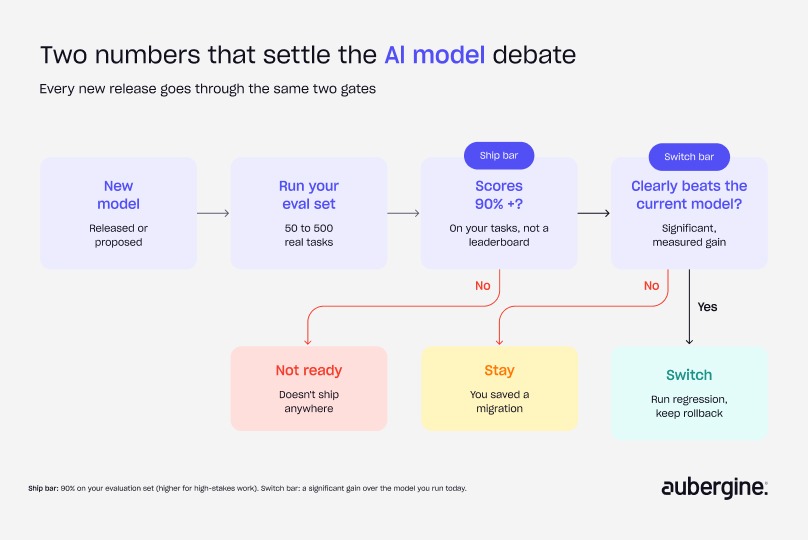
Most teams have no agreed bar, so every new release reopens the argument. We use two:
The ship bar sits at the low end of the 90 to 95% range we describe in why AI agents fail, and higher-stakes workflows should sit higher. The switch bar is simple: if a model isn't clearly better on your evals, don't fix what isn't broken. Every switch costs regression testing, prompt tuning and a round of user adjustment, even when the new model is better.
Compare AI models on cost per completed task
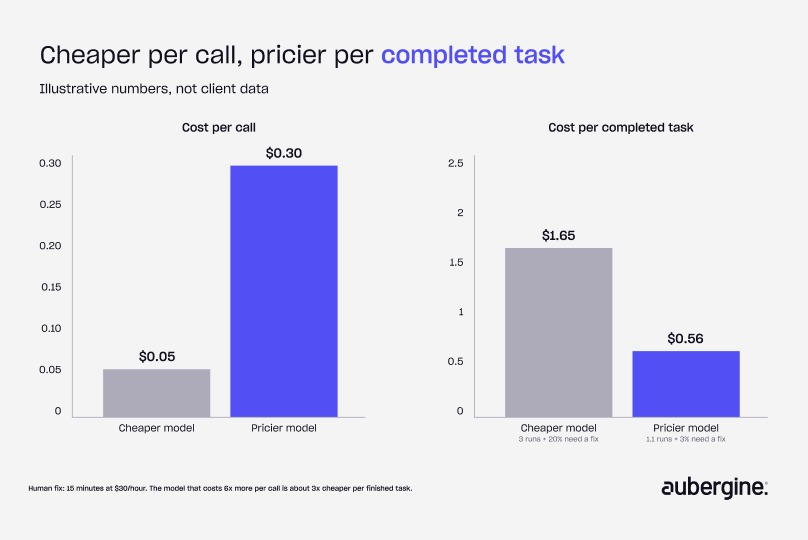
Price per million tokens is the number vendors publish, and it rarely decides anything. In my experience, a weaker model can waste time and credits going back and forth, and needs constant correction. That cost doesn't show up in the price per call. Here's an illustrative example (not client data):
The model that costs 6x more per call is about 3x cheaper per finished task. The reverse happens too: for simple, high-volume steps, a smaller model often clears the ship bar at a fraction of the cost. You only find out by running both on your evaluation set. For the wider budgeting picture, see our blog on budgeting for AI usage beyond tokens.
How to compare AI models side by side in five steps
Once the evaluation set and the two bars exist, a model comparison becomes a routine run:
1. Shortlist two or three models. Leaderboards are fine for this step; they tell you which models are capable enough to test.
2. Run every candidate on the same evaluation set, with the same prompts, tools and settings, so the model is the only variable.
3. Score correctness and behavior, using the checks above.
4. Work out cost per completed task for each, including retries and human fixes.
5. Apply the ship bar and the switch bar, then record the result with the date, so the next comparison starts from evidence.
Dating the record matters. Models change every few months, and a comparison from last spring tells you little about this quarter's options.
The model is a choice you can reverse (mostly)
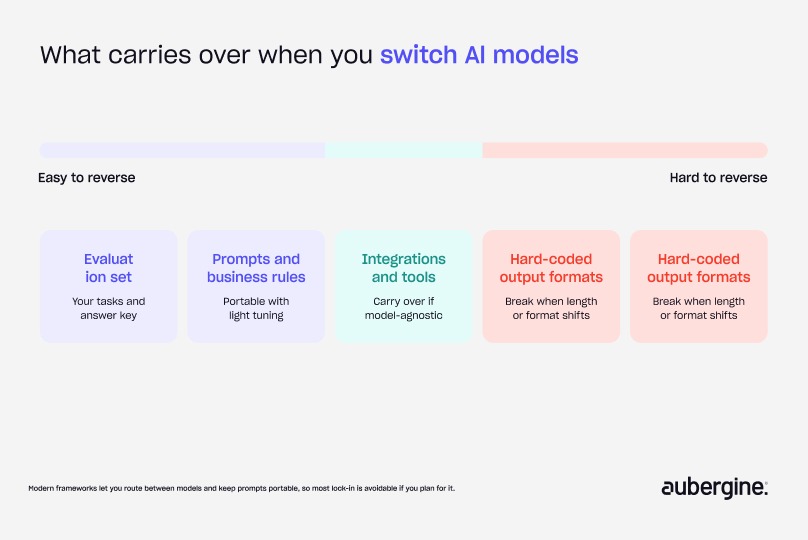
In a typical business workflow, the model is one layer in a larger system, and usually the easiest one to swap. Your prompts, evaluation set, business rules and integrations carry over. That's what made it possible for us to roll back from Opus 5 without rebuilding the agent.
The choice gets hard to reverse when the system is built around one model:
- Heavy fine-tuning: tuning done on one model doesn't transfer to the next
- Model-specific tooling: tools, prompt formats or settings that only work well with one model's quirks
- Hard-coded output assumptions: downstream steps that depend on one model's format or answer length
Modern frameworks let you route between models and keep prompts portable, so most of this lock-in is avoidable if you plan for it. Treating the foundation model as a layer you integrate rather than own is the same principle we set out in build or integrate.
When a CTO says "just use the newest model"
Newest is a release date, not a requirement. Models should be judged on how well they meet the expectations you defined, not on which one is latest or biggest. Run the new model against your evaluation set. If it clears your switch bar, switch. If it doesn't, you've saved yourself a migration. Model choice is also one of eight decisions that determine whether AI reaches production, which we lay out in the AI 360 Compass blog.
For the CEO, in two sentences: the best-ranked AI model isn't always the best for your product, and swapping without testing can make things worse. Ask your team for two numbers: the score a model must hit to ship, and the gain a new one must show before you switch.
Cost per completed task also feeds straight into how you plan AI spend.
Run your next model decision on your own work
Before your next model upgrade, pull 50 real tasks from your own history, write down what a good outcome looks like for each, and run the current and candidate models side by side. Track the ship bar, the switch bar and cost per completed task.
Aubergine's AI team handles LLM selection and evaluation as part of every agent and product we build. If a model decision is on your table, let's talk.
FAQs
Which AI model is best for business use right now?

No ranking stays true for long, so there's no stable answer. The best model for your business is the one that clears your ship bar on your own tasks at the lowest cost per completed task. Re-run that test whenever a serious contender launches.
How many examples do I need to compare AI models fairly?
Somewhere between 50 and 500, depending on how varied the work is. Fifty real tasks are enough to spot a model that behaves badly. Grow the set from production failures over time.
Are LLM leaderboards useful at all?
Yes, for building a shortlist. They show which models are capable enough to be worth testing. They can't show how a model behaves with your users, your format or your data.
Should we use more than one AI model?
Often, yes. Many systems route simple, high-volume steps to a smaller model and harder steps to a larger one. Score each step on its own evaluation set and its own cost per completed task.
How often should we re-evaluate the model we use?
Whenever a credible new model ships or your task changes, and on a regular schedule for anything in production. Keep the evaluation set current so a comparison is a routine run, not a project.
Does an open-source or self-hosted model change this method?
The method stays the same: same evaluation set, same thresholds, same cost per completed task. Hosting your own model adds infrastructure and maintenance costs, so include them in the per-task number.
Is switching AI models risky once we're in production?
Less than most teams fear if the system is model-agnostic, and more than they expect if it relies on fine-tuning or model-specific tooling. Run the full regression set before switching and keep the old model available for rollback.


Authors

Aaditya Brahmbhatt

More ways to listen


Podcast Transcript