
Most AI conversations start in the same place. A product team brings an idea to the table, either an AI feature for an existing product or an AI-native application, and within ten minutes someone asks which AI model to use.
It’s a fair question asked too early. RAND found that more than 80% of AI projects fail, roughly twice the failure rate of IT projects without AI. Very few of those projects fail because someone picked the wrong model. They stall on questions nobody answered at the start:
- Does this idea need AI at all?
- Can our data support it?
- Will people trust it enough to use it?
- Can the business afford it at full volume?
- Will IT and compliance approve it?
Production AI depends on eight disciplines, decided together. We call them the AI 360 Compass. We run every AI idea through it in a two-to-three-week discovery sprint, then carry the same lens into engineering. This guide covers each discipline at the level a decision-maker needs, with links to our deeper guides for teams that want the detail.
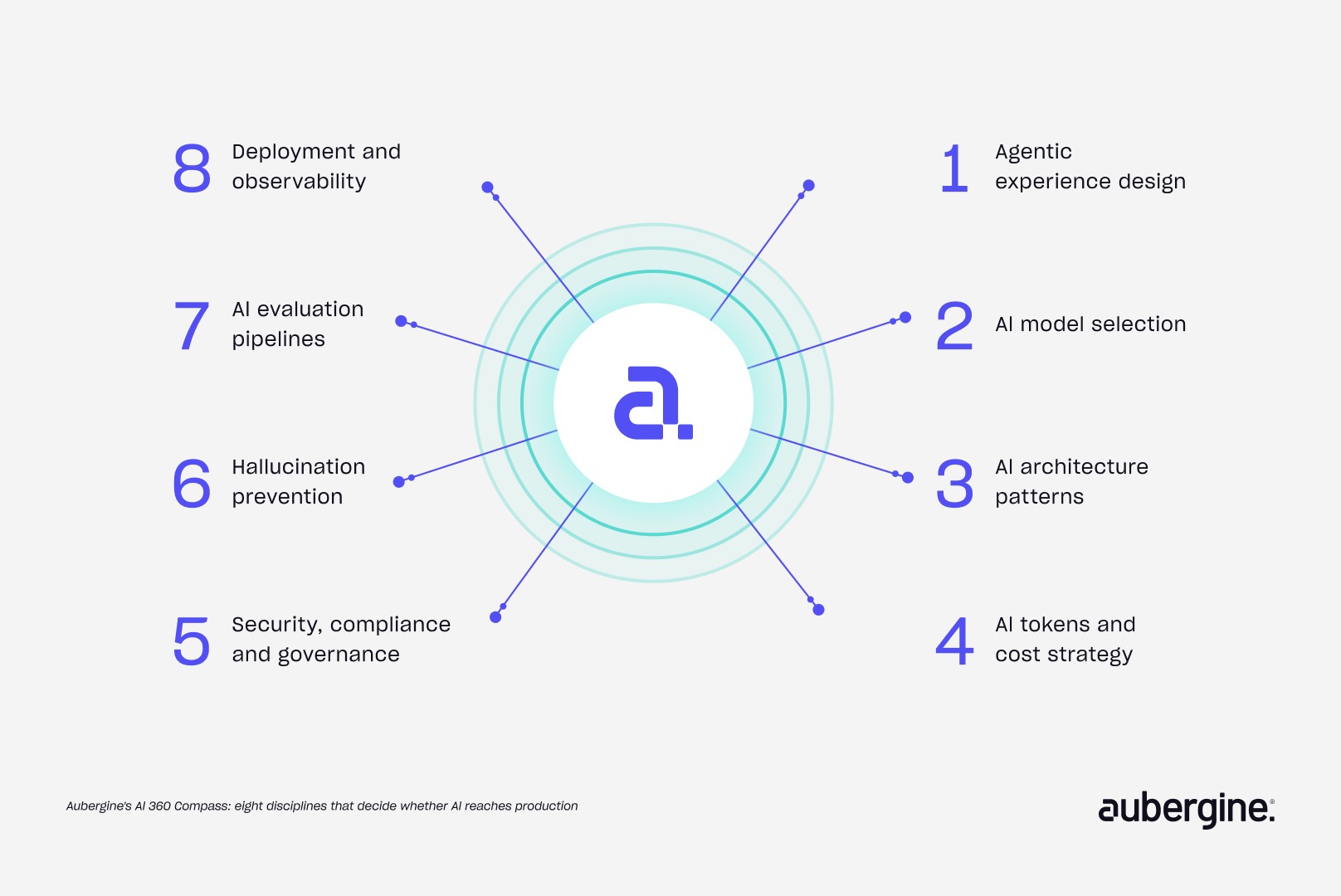
The 8 disciplines at a glance
Before the compass: does this idea need AI at all?
Every AI discovery starts with a filter. We check whether the idea needs a language model, an AI agent, traditional machine learning, or plain automation, and whether the available data can support it. Ideas that pass move into the eight disciplines. Ideas that don’t still get an answer, usually a cheaper one.
Data readiness gets the same scrutiny. Does the data exist, is its quality good enough, and can an AI answer built on it be trusted? When we ran a dry run on Nexus, our internal operations system, a request to automate timesheet review started with exactly that check.
An industrial maintenance company we worked with wanted AI across its whole operations platform. Discovery showed that several proposed “AI features” were workflow bottlenecks that process redesign could fix. Only a subset genuinely benefited from AI. We cover how to separate the two in identifying AI opportunities in product development.
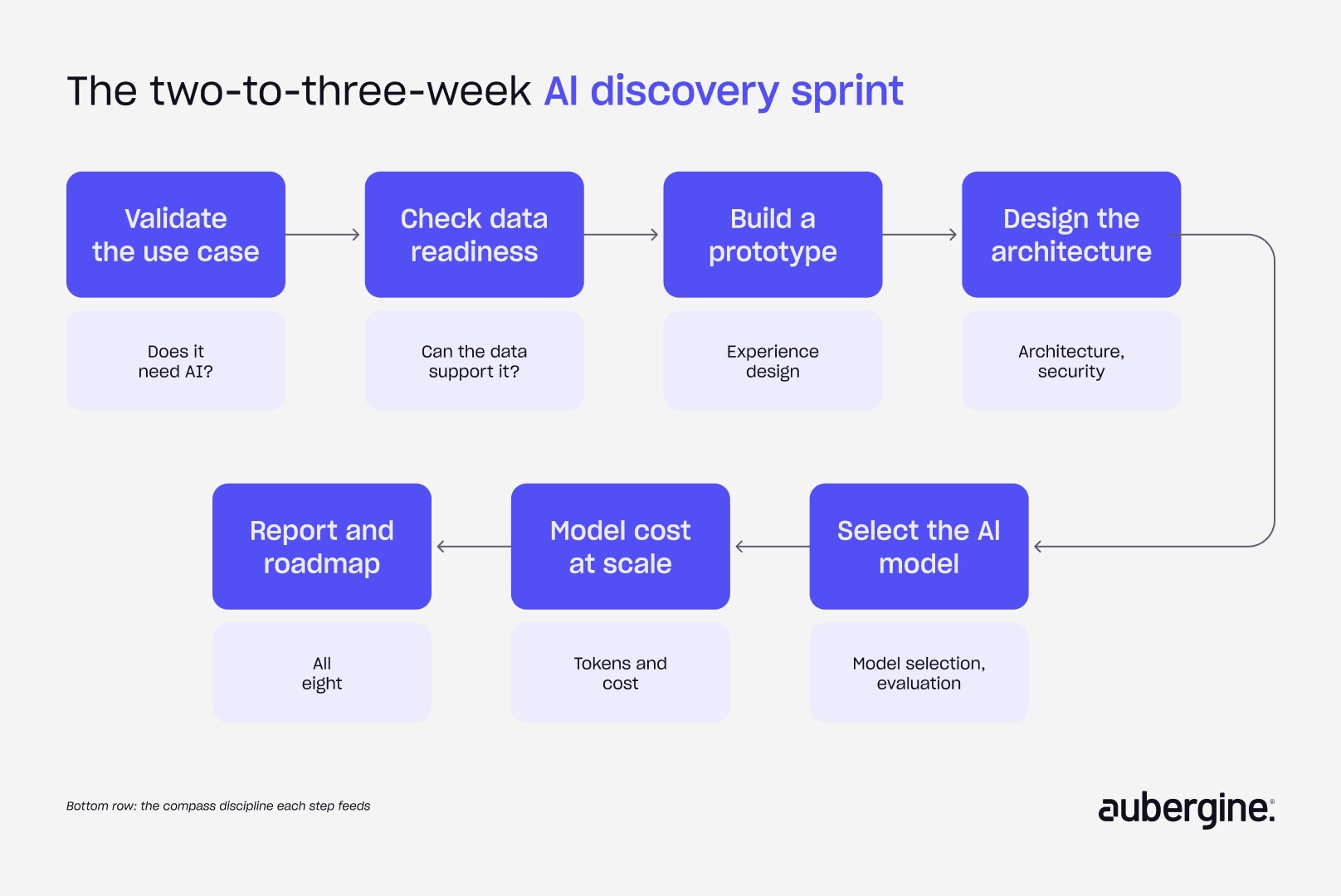
The discovery sprint runs in seven steps:
- Validate the use case
- Check data readiness
- Build a prototype
- Design the solution architecture
- Select the AI model
- Model cost at scale
- Deliver a final report and roadmap
Have an AI idea on the table, or an AI feature that isn’t getting used? Our discovery sprint runs it through all eight disciplines in two to three weeks. Talk to us about a discovery sprint.
1. Agentic experience design: how do you design AI agents people trust?
Agentic experience design decides how people and AI agents share a task. It covers what the agent does on its own, what it shows while working, where a human steps in, and how mistakes get reversed. AI adoption is usually won or lost here, well before model quality has a chance to matter.
Gartner predicts over 40% of agentic AI projects will be canceled by the end of 2027, citing escalating costs, unclear business value, and inadequate risk controls. Model quality isn’t on that list.
Trust gets decided in the first session. We use four questions to test it:
- See: can users tell what the AI does?
- Try: can they get a useful result without heavy setup?
- Control: can they see what it’s doing and step in?
- Undo: can they reverse a mistake quickly?
For Fathom, the AI meeting assistant, we replaced an empty first-use dashboard with a tutorial-style practice call. New users experienced the product before their first real meeting. The full framework is in the first five minutes: why AI adoption starts with trust.
Autonomy is set for each task separately, and it grows as an agent earns a track record:
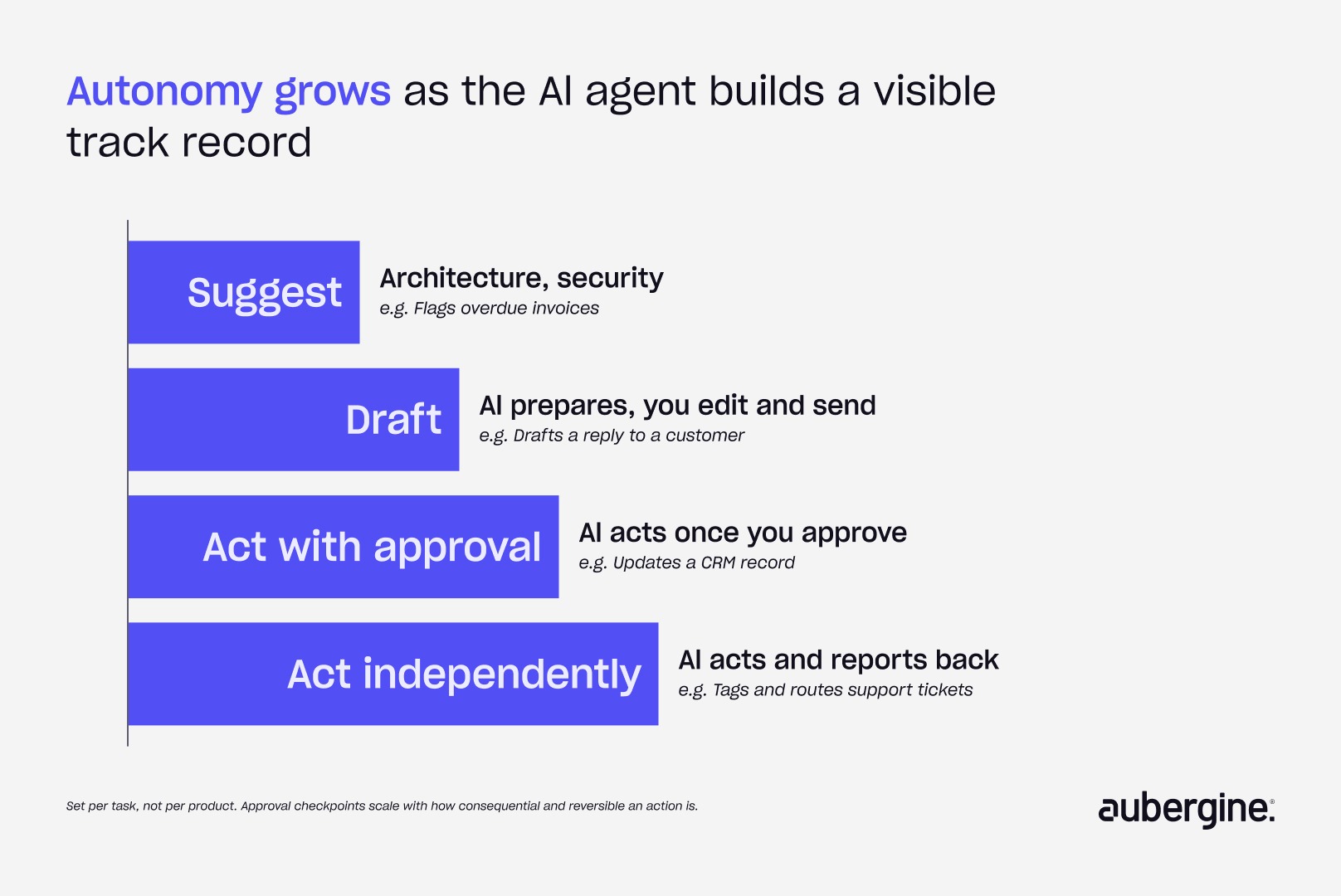
Approval checkpoints follow how consequential and reversible an action is. A checkpoint on every action creates approval fatigue, and people start clicking “yes” without reading. We explain the patterns that keep trust intact over time in the UX patterns that make AI agents trustworthy.
2. AI model selection: how do you choose the right AI model?
The right AI model is the least expensive one that clears your quality bar for a specific task, tested on your own data. Public leaderboards don’t tell you that. Most products end up using more than one model, and the business logic built around them matters more than the model itself.
Five criteria shape the choice:
- Quality on your task: how often it gets your real examples right
- Cost per task: what a completed job costs, including retries
- Speed: whether users will wait for it
- Privacy: where data goes, and whether it can stay in your region
- Scale: how it holds up at production volume
Large models handle open-ended, multi-step reasoning well. Small language models (SLMs) are cheaper and faster, and often strong enough for narrow, high-volume jobs like classification and extraction. Many production systems route work between both.
Integrating a mature model or service is usually the faster path. Foundry AI, an HR technology company, integrated an existing voice SDK instead of building speech infrastructure. That turned a three-month project into a three-week release. Their engineering effort went into interview logic and HR rules, where their advantage lives. We break this decision down in build or integrate: how to approach AI in product building.
One more rule: design so the model can be swapped. Providers update and retire models regularly, and a system tied to one model version ages quickly.
3. AI architecture: what’s the simplest design that holds up?
Most business use cases fit a small set of proven AI architecture patterns. The right one is the simplest pattern that meets the task’s accuracy, speed, and cost requirements. Agentic complexity earns its place only where a simpler pipeline can’t do the job.
Anthropic’s guidance on building agents makes the same case: start simple and add steps only when they measurably help. We group the options into four tiers:
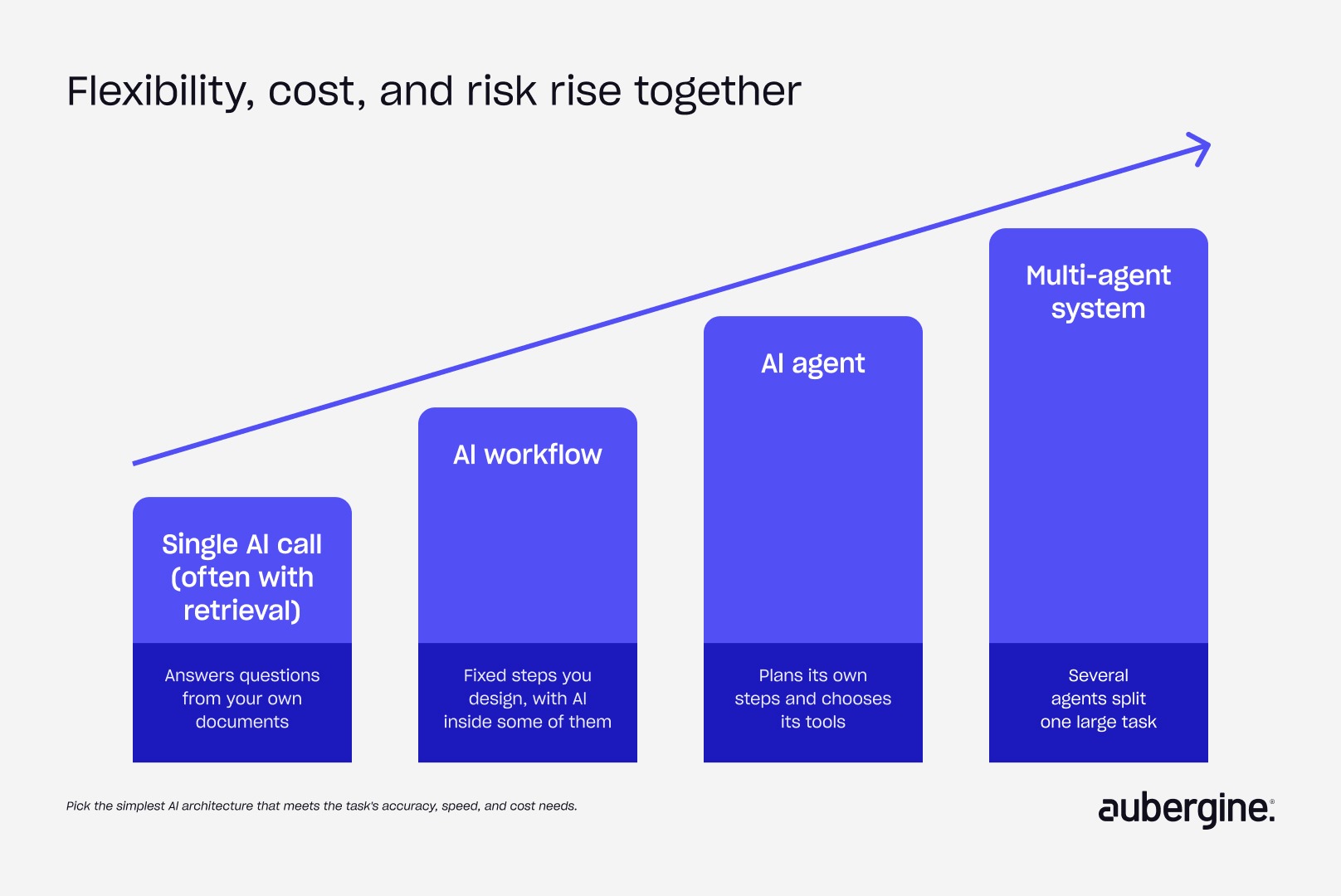
An AI workflow follows a path you designed. An AI agent decides its own path. Most production systems we build are AI workflows with a few agentic steps inside them. That keeps them easier to test, secure, and explain to an auditor.
Project Trio, our internal workflow automation system, shows the pattern. It connects AI to Figma, Jira, ClickUp, and Linear through the Model Context Protocol (MCP), an emerging open standard for linking AI to business tools. Work moves through sequential steps with validation checkpoints and human approval gates. Read more in how we used AI-driven workflow automation to improve product workflows. For what happens when agents get more freedom than the task needs, see why AI agents fail.
4. AI tokens and cost: how do you keep AI affordable at scale?
AI costs are controlled at design time. You budget around the cost of one completed task, such as one claim processed or one ticket resolved, and you shape what goes into each model call. The price per AI token is one input to that number and rarely the source of budget surprises.
What are AI tokens? Tokens are the small chunks of text an AI model reads and writes. Providers bill per token, for both what you send in and what comes back.
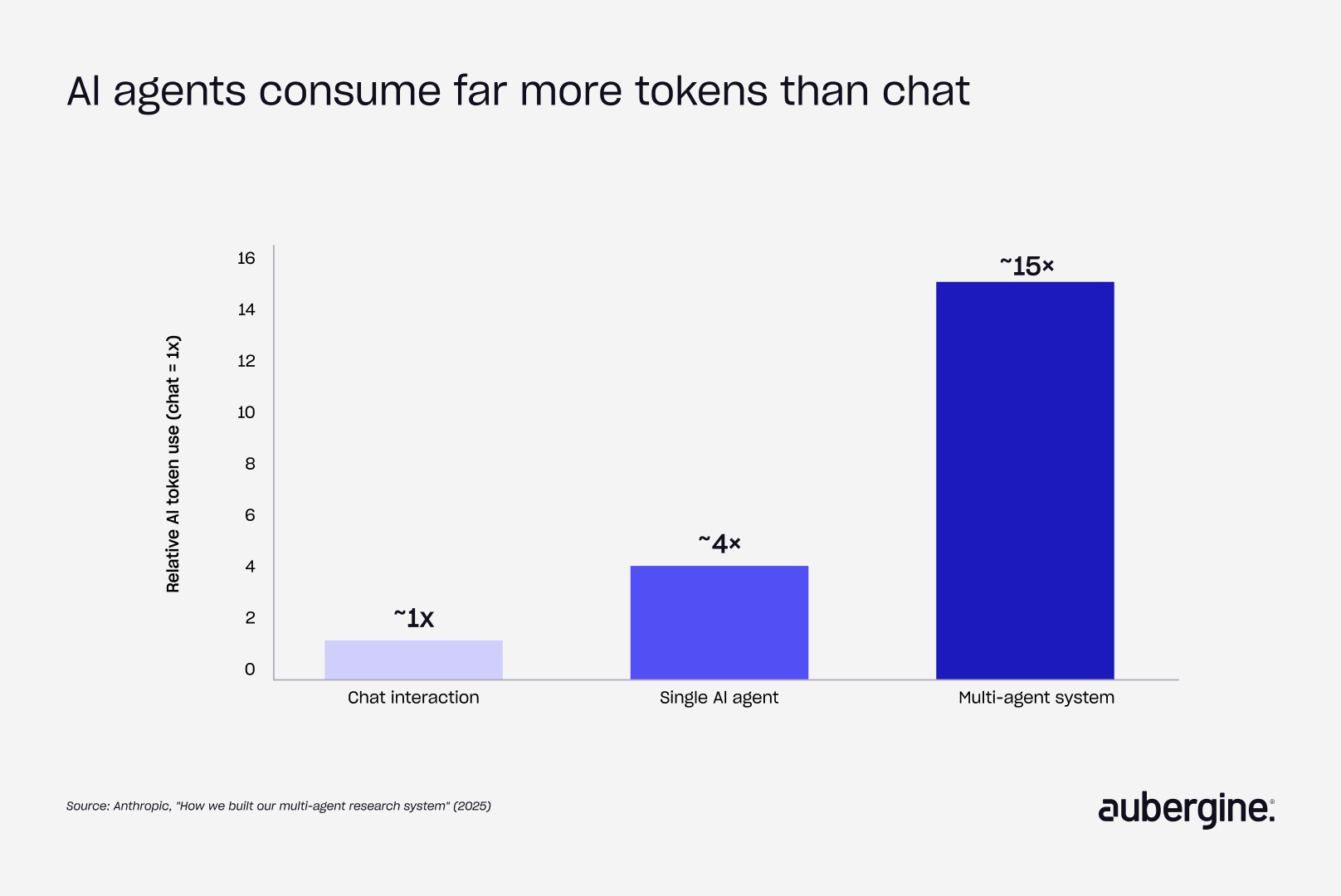
Per-token pricing misleads because one request to an AI agent triggers several model calls: planning, tool lookups, verification, and retries. Anthropic reported that agents use about 4× the tokens of a chat interaction, and multi-agent systems about 15×.
An illustrative insurance claims agent shows the gap. A single-call estimate prices one claim at about $0.014. The full workflow costs $0.27 per claim at the same token rate, roughly 20× higher. A budget built on the first number breaks at production volume.
Forecasting is where teams struggle most. Only 11% of organizations can forecast AI spending within ±10%, according to Mavvrik and Benchmarkit’s 2026 survey of 396 enterprises.
Cost questions we answer in discovery:
- What does one completed task cost, end to end?
- What happens at 5×, 10×, 100×, and 200× today’s volume?
- Which steps can run on a smaller, cheaper model?
- What can be cached, or batched for off-peak processing?
- What do human review, security review, and evaluation add in year one?
- Where do budget alerts and a cheaper fallback kick in when usage spikes?
A cheaper configuration only counts as a saving if it still clears the quality threshold set in evaluation. We connect cost to business outcomes in how to measure AI ROI.
5. Security and governance: what does secure AI require?
Secure AI controls three things: what data reaches the model, what the AI is allowed to do, and the record of everything it did. We design these controls in from the first prototype, because security review is often the real gate on launch.
What is prompt injection? Prompt injection is when instructions hidden inside a document, email, or user message try to hijack what the AI does. OWASP ranks it the top risk for applications built on large language models.
Good governance comes down to clear ownership:
- A named owner for every AI system
- An inventory of models in use
- An AI use policy employees can actually follow
- A plan for shadow AI, meaning the tools employees adopt without approval
Compliance depends on industry and geography:
- SOC 2 for enterprise readiness
- GDPR for EU personal data
- HIPAA for healthcare
- GLBA for financial services
- AI-specific rules such as the EU AI Act’s risk tiers and India’s DPDP Act
We also review the model provider’s data handling, retention, and training-use policies during discovery, well before legal asks.
6. Hallucination prevention: how do you stop AI from making things up?
Hallucination can be reduced but not eliminated. Production systems combine prevention, automated detection, and a product design that contains the damage when a wrong answer gets through. The most dangerous version is an answer that’s fluent, confident, and wrong.
We learned this on Insifi, our tool for asking plain-English questions of Nexus data:
- Asked how many hours a team had logged on a project, it returned a clean, specific number.
- The number blended in a similarly named project and included people from outside the team.
- Nothing in the response signaled doubt.
What reduces hallucination in practice:
- Pulling facts, figures, and dates from the system of record instead of the model’s memory
- Answering from retrieved documents, with citations that are checked automatically
- Giving the model explicit permission to say “I don’t have enough information”
- Testing whether it actually says so when it should
Containment then depends on risk:
The full Insifi story is in what a 50% accuracy score taught us about building AI agents.
7. AI evaluation: how do you know your AI is still working?
An AI evaluation pipeline is a repeatable test suite that scores your system’s output against real examples every time something changes. It grows by turning each production failure into a permanent test case, so a mistake you’ve fixed can’t quietly return.
The core asset is a golden dataset: real questions paired with verified answers, drawn from three sources:
- Real usage samples
- Edge cases, such as ambiguous phrasing or missing data
- Adversarial cases designed to push the AI into guessing
Evaluation runs in two modes:
- Before release: every change is tested against the golden dataset.
- After release: a sample of live traffic and user feedback (thumbs, edits, escalations) catches the failures nobody thought to test.
For AI agents, we also score the path: which tools the agent called, and in what order.
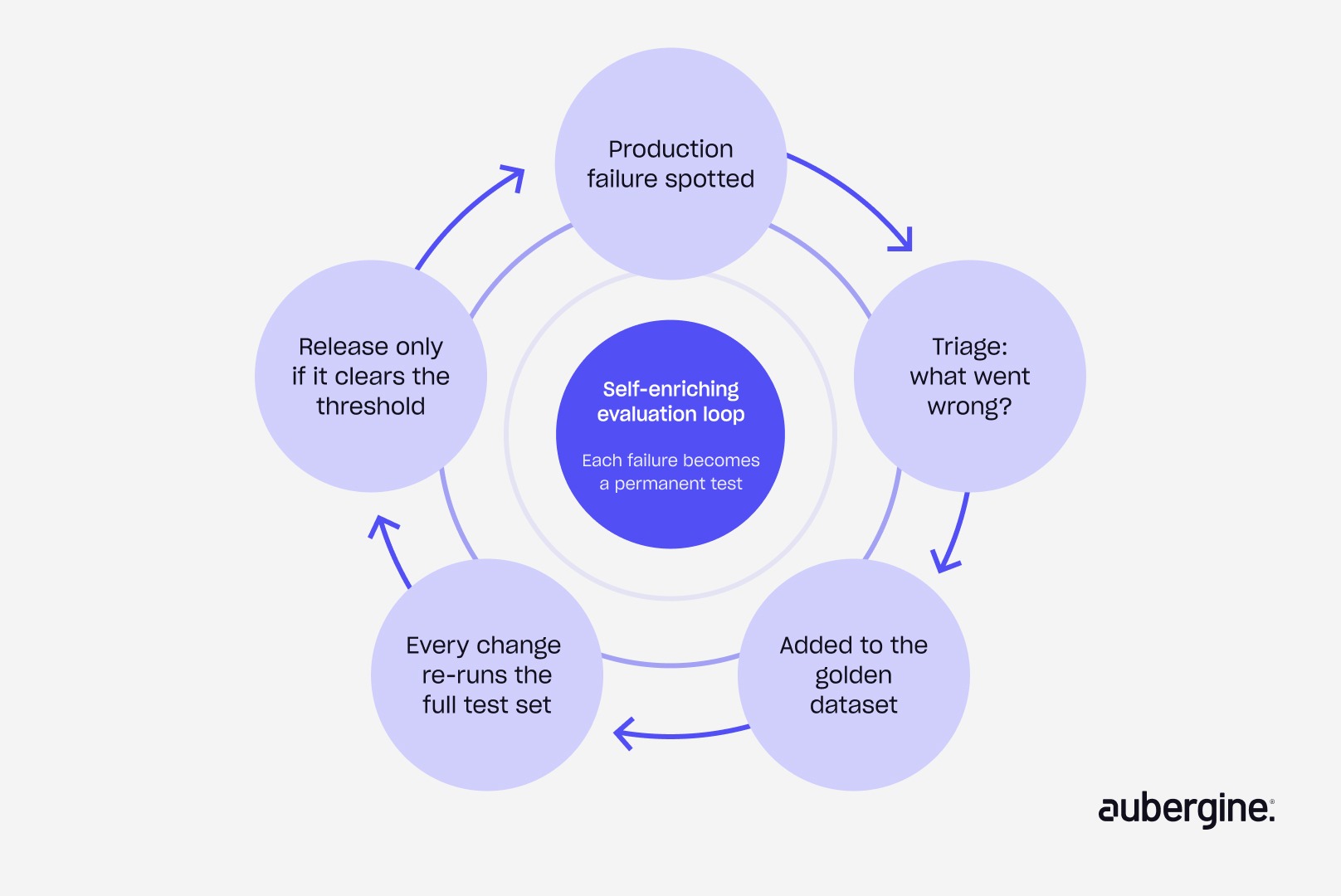
For Insifi, a golden set of 200 to 300 handwritten questions pinpointed the exact phrasing and data patterns producing wrong answers. That precision turned “the AI is sometimes wrong” into a fix list.
8. Deployment and observability: how do you change AI safely in production?
Production AI treats prompts, model versions, and data settings with the same discipline as code. Every change is versioned, tested before release, rolled out to a small group of users first, and reversible within minutes.
The release flow we use:
- A change is proposed and reviewed.
- It runs against the full evaluation suite.
- It goes live for a small slice of real traffic.
- It reaches everyone only after clearing the quality threshold.
- Rollback to the last good version stays available at every step.
Four signals tell us whether a live system is healthy:
- Answer quality
- Response speed
- Cost per outcome
- How often users override or escalate, which is the most direct measure of trust
A system can also degrade without anyone on your side changing anything, because providers update the models underneath. Continuous monitoring surfaces that within hours, before it turns into a customer complaint.
How the eight disciplines connect
None of the eight can be handled alone, because each decision constrains the others:
- Risk levels set in experience design decide security approval gates and hallucination handling.
- AI model selection changes the cost model.
- AI architecture choices decide what can be evaluated, traced, and rolled back.
- Evaluation sits underneath every deployment decision.
That’s why a discovery sprint covers all eight at once. It delivers:
- Validated use cases, including the ideas that don’t need AI
- A data readiness assessment
- A working prototype
- A solution architecture
- An AI model recommendation
- A cost model at 5× to 200× scale
- A roadmap for the build
The same compass carries into engineering, where each discipline becomes a workstream with its own owner.
The model is one decision out of eight
Back to the question that opens most AI conversations: which AI model should we use? It matters, and it’s worth getting right. It’s also one decision out of eight, and rarely the one that decides whether people use what you build.
Run your AI idea through the compass
Bring us one AI idea, or one AI feature that’s live but underused. In two to three weeks, our discovery sprint gives you:
- A clear answer on whether the idea needs AI
- A working prototype
- A cost model at production scale
- A roadmap your IT and compliance teams can sign off on
Whether you're exploring AI opportunities, building AI-native products or scaling existing AI solutions, explore how our AI strategy and development expertise can help turn your ideas into production-ready solutions.
Book a discovery sprint with Aubergine
FAQs
How long does an AI discovery sprint take, and what do we have at the end of it?

Two to three weeks. You leave with validated use cases, a data readiness assessment, a working prototype, a solution architecture, an AI model recommendation, a cost model at 5× to 200× scale, and a build roadmap. If the answer is “don’t build this,” you get that in writing with the reasoning.
We already know which AI model we want. Can we skip discovery?
You can, but the model is the decision least likely to sink the project. Discovery tests the other seven disciplines against your chosen model. It often confirms the choice and also shows where a smaller model could handle part of the workload for less.
Which of these disciplines do teams most often leave until it’s too late?
Cost and security. Cost surprises show up only at production volume. Security review usually happens right before launch, when changing the architecture is most expensive. Both are far cheaper to design in during the prototype stage.
Does a small AI feature need all eight disciplines, or only AI agents?
Every AI feature touches all eight, at different depths. A summarization feature needs light evaluation and a simple architecture. An agent that updates customer records needs approval gates, audit logs, and tight access controls. The compass scales to the risk of the feature.
What happens if discovery concludes we don’t need AI?
That’s a useful outcome. You get the alternative, usually workflow automation or a process redesign, along with the reasoning. Several of our discovery engagements have ended with a smaller, cheaper fix that solved the actual bottleneck.
Can this framework be applied to an AI product that’s already live?
Yes. For live products we start from usage data: where users drop off, override, or escalate, and where costs drift. That usually points to one or two disciplines causing most of the problem.
Who on our side needs to be involved in discovery?
A business owner who can define success, someone who knows the data, and a representative from IT or security. End users join for prototype testing. Most clients commit a few hours a week from each person.
Do we need to train or fine-tune our own AI model?
Rarely. Most business use cases work well with an existing model plus good retrieval, business rules, and evaluation. Fine-tuning makes sense when you have a narrow, high-volume task and enough quality examples to prove it beats the alternatives.
How is this different from a standard AI readiness assessment?
A readiness assessment usually ends with a report. Discovery ends with a working prototype, a costed architecture, and a tested model choice for a specific use case, so the next step is building, not more planning.


Authors

Harsh Soni

More ways to listen


Podcast Transcript