
Most conversations about AI adoption focus on what happens after launch: usage numbers, retention curves, whether people come back in week two. By the time a team is looking at those numbers, the decision that actually determined them has already been made, in the first few minutes a user spent with the product.
Microsoft's UX research team studied this directly. Watching sales managers try a new sales agent for the first time, they found that impressions were shaped by how the onboarding framed value, capability, and role, not by how good the agent's output eventually was.¹ Users had already decided whether to trust the system before they saw what it could really do.
That's the problem this piece is about: how to design the first five minutes of an AI feature so people actually get to the good part.
The problem; asking users to trust AI before showing its value
Most AI onboarding runs backward.
It asks for context, configuration, and patience up front, and only pays that trust back with output at the end. Sales managers testing Microsoft's agent had to supply knowledge sources, configure the system, and run simulations before seeing a single draft email. The finding was blunt: this made it hard for people to stay motivated through setup, regardless of how good the agent turned out to be.
Common sources of friction in AI workflows built for non-technical teams:
- Long onboarding flows before the first real task
- Requests for permissions or data with no visible payoff
- Users left to write prompts from scratch with no guidance
- AI working in the background with no indication of what it's doing
- No clear picture of what the system is actually built to do
The fix lies in reordering setup, not removing it: show a useful baseline result from minimal input first, then ask for more context once the user can see exactly why it would help.¹
Our four-part framework for the first five minutes
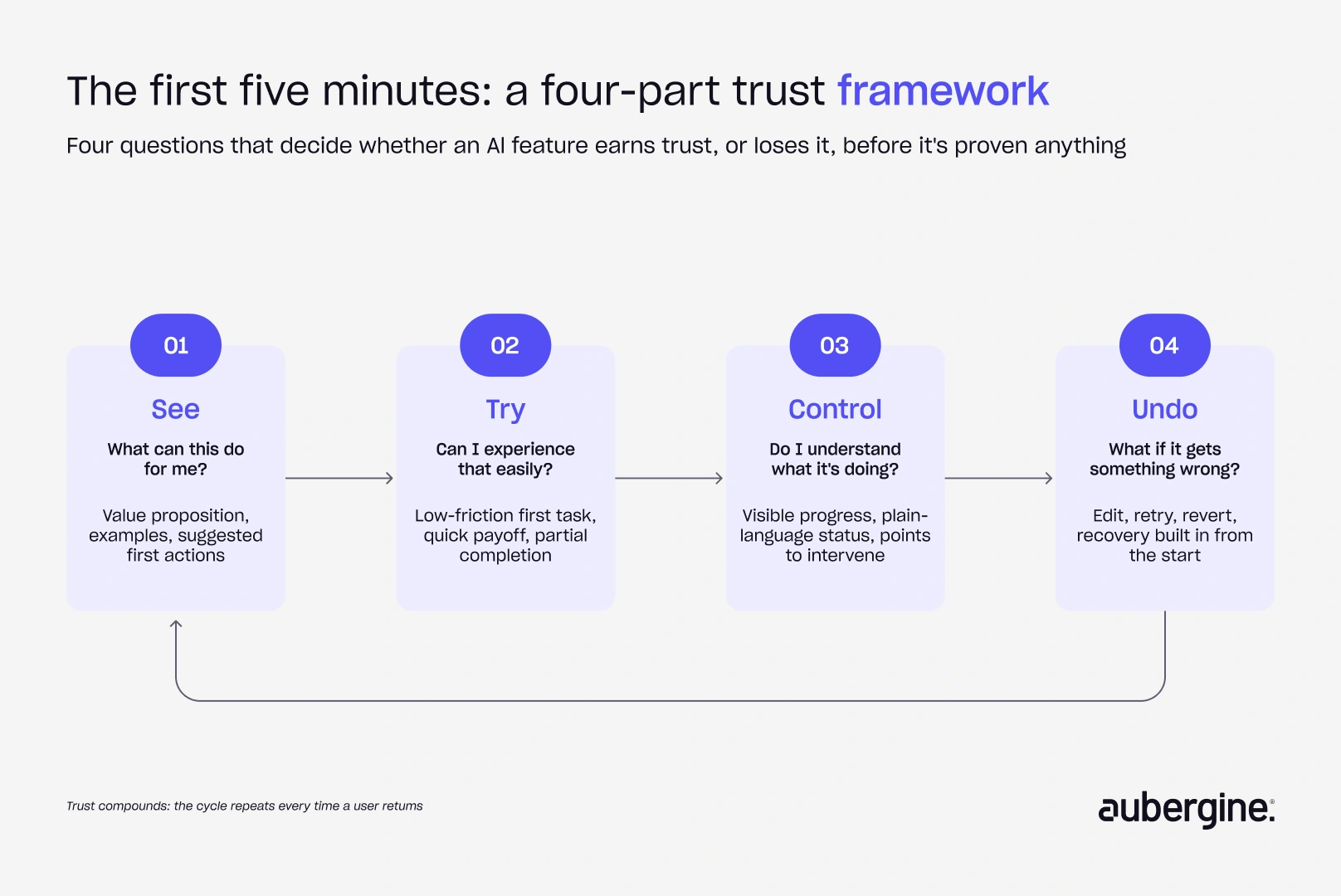
Building AI features across different products, we've settled on four questions that predict whether that first session builds trust or burns it:
- Can users see what the AI can do?
- Can they try it without a big upfront cost?
- Can they control what it's doing?
- Can they undo it if it gets something wrong?
Each one is a design problem we've had to solve directly, on real products, not a theory we picked up secondhand.
1. See: show users what your AI agents can do
People can't evaluate a feature they don't understand yet. Without a clear sense of what an AI feature is for, they either disengage before trying it or attempt tasks it was never built to handle, and either way the first impression is wrong.
This means giving people:
- A clear, stated value proposition
- Example outputs or a preview of what "done" looks like
- Suggested first actions for people who don't know what to ask
- Different entry points for someone who arrives with a specific task versus someone still exploring
Fathom, the AI meeting assistant, faced the exact same. Early on, users would sign up and not know what to do with an empty dashboard, so we rebuilt onboarding around an interactive, tutorial-style practice call. New users walk through a real meeting scenario before their first actual one, so they see and do the thing the product is built for instead of having to imagine it. Don't make users imagine the value. Show them.
2. Try: let people experience AI workflows before they commit
More context almost always makes an AI feature more useful, but asking for it all upfront is exactly what causes people to abandon before they ever see the payoff. This tension is real, and it doesn't resolve itself just by asking for less information. It resolves by connecting each ask to a visible reason.
In practice, this means:
- A useful result from whatever information has been provided so far
- Context requests tied to a specific, visible improvement, not a generic "personalize your experience" prompt
- Partial completion that still produces something usable
- A visible payoff at every onboarding step, not a promise that it'll be worth it later
This is the exact problem we solved for a women’s wellness retail company. Instead of asking users to answer a block of onboarding questions with no context, we connected each input directly to the personalized insight it unlocks, so the ask and the payoff sit next to each other instead of being separated by a wall of setup. Let users experience value while they build context, not before it.
3. Control: keep humans in the loop as AI acts
The moment an AI feature moves from generating text to taking actions, visibility and control stop being nice-to-haves. Research on agentic AI has shown that when users have little visibility into what an agent is doing, they tend to repeat prompts and second-guess whether the system has understood them.¹ We've seen the same behavior in our own agentic products whenever we've shipped without enough status visibility.
The pattern that fixes it:
- Plain-language status updates ("analyzing prospect data," "drafting outreach") instead of a blank spinner
- A clear signal that the system understood the request and is working on it
- A defined point at which the user can step in
- Human-in-the-loop checkpoints scoped to risk, not to how often the AI acts
The more the AI acts on someone's behalf, the more visibility and control matter.
4. Undo: make failure recoverable
Trust doesn't require an AI feature to be perfect. It requires people to believe a mistake won't cost them something they can't get back. This belief has to be designed in, not assumed.
The requirements are consistent across every product we've built this into:
- Edit, retry, and regenerate options built in from the start
- A fast, visible way to reverse an action, not just an apology after the fact
- Recovery paths designed before the automation itself, not bolted on after the first bad output
Building this into your UX design process

Laid end to end, the four parts map onto the actual chronology of a first session:
- See → users see what the system can do
- Try → users get an early result without heavy setup
- Control → users see what's happening and can intervene
- Undo → users can review, correct, or reverse it (UNDO)
Smaller decisions inside the same first session also shape whether the experience feels relevant:
- Onboarding tone and language
- How much context gets asked for, and when
- Whether suggested prompts match what the user actually came to do
- Whether different user types get different first sessions, not the same generic walkthrough
A product with several distinct user types but one dashboard shown to everyone is a common failure mode here. Someone arriving with a specific task and someone still exploring need different first five minutes, not the same tour repeated twice.
A first-five-minutes trust audit
Before shipping or redesigning an AI feature, run it through these questions:

If the honest answer to any of these is no, that's the gap to close before launch, not after the first wave of drop-off data comes in.
Why this matters for AI adoption at scale
Gartner projects that over 40% of agentic AI projects will be canceled by the end of 2027, citing escalating costs, unclear business value, and inadequate risk controls as the leading causes. Model quality doesn't make that list. The projects that get canceled are rarely the ones where the AI produced bad output. They're the ones where nobody built enough trust, transparency, or evidence of value into the product for the organization to keep funding it.
This is a UX design process problem before it's a modeling problem:
- A feature that can't clear the first five minutes with real users won't survive a sponsor review six months later
- Trust lost in onboarding is expensive to win back once a user has already written the product off
- Evaluation and cost governance matter, but they only get the chance to matter if people are still using the feature
Trust starts before the first output
AI trust gets decided before anyone has enough experience with a product to judge the model behind it. The first interaction has to:
- Show value
- Offer a low-risk way to try it
- Keep the user in control
- Make mistakes recoverable
Get this right, and the model quality debate becomes secondary. Get it wrong, and it won't matter how good the model actually is, because nobody stuck around long enough to find out.
We've written before about the patterns that keep users trusting an AI agent once it's already taking action.
So, what happens in your first five minutes?
When someone encounters your AI feature for the first time:
- Do they know what to do?
- Do they see value before they give you something?
- Do they know what the AI is doing?
- Do they have a way back when it gets something wrong?
If you had to answer those questions honestly, where would your product leave a first-time user?
We help teams answer exactly this before poor onboarding turns into poor adoption.
FAQs
How literal is "the first five minutes" for an AI product?

Not literal at all. It refers to the first meaningful session with a feature, however long that takes, not a stopwatch measurement. A five-second first interaction and a five-minute one follow the same logic: value has to show up before the user is asked to invest much.
Does this framework only apply to fully autonomous AI agents, or does it work for simpler AI features too?
It scales down. A basic AI assistant still needs to show value early and recover from a bad output gracefully. Control and visibility matter more as autonomy increases, since an agent taking real actions has more to be transparent about than one just generating text.
How do we ask for less information without losing the personalization users expect?
Ask for context only when it will materially change the result, and show that impact directly, for example with a before-and-after comparison. Default to sensible starting behavior and let people refine it after they've seen output, rather than configuring before they've seen anything at all.
What's the difference between a demo and the "aha moment" this framework is describing?
A demo shows a hypothetical outcome. An aha moment happens when the user's own input produces something they can immediately use or recognize as valuable. A canned demo doesn't close the trust gap the way a genuine early result does.
Should every AI feature include an undo option, even low-stakes ones?
Not with the same weight everywhere. Low-stakes drafting can rely on the user simply reviewing before acting. The moment a feature takes an action with a real consequence, like sending something or changing a record, undo or rollback stops being optional.
How do we tell if our current onboarding is asking for too much before showing value?
Watch where people stop. If drop-off clusters around a setup step rather than around the actual task, that's a strong signal the onboarding is asking for investment before it's earned any trust. Session recordings and time-to-first-output are usually more telling here than survey feedback.


Authors

Rupali Saini

More ways to listen


Podcast Transcript