
Picture two versions of the same moment. A salesperson finishes a client call, and the next ten minutes are about one thing: making sure the right follow-ups happen.
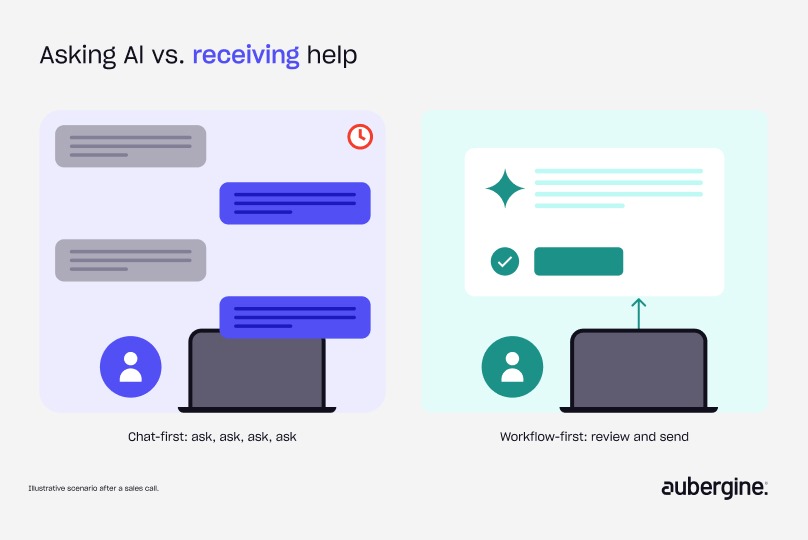
In the first version, an illustrative chat-first flow, they open an AI chatbot and start asking. Summarize the meeting. List the action items. Which opportunity does this belong to? Draft the follow-up. Four prompts before the real work begins, written by someone whose attention is already on the next call.
In the second version, a card is waiting in Slack when the call ends: the follow-up is drafted, the opportunity is matched, and the salesperson can review it, edit it or send it.
The difference is who starts the interaction. In the first, the employee has to initiate AI. In the second, the AI arrives as a contextual next step inside the workflow. We explored the second approach while designing a sales intelligence product for a client whose teams already worked across meetings, the CRM and Slack, Teams or Webex. One question shaped the design: why make users ask for something when the system already has the context to help them?
The short answer: good AI agent design for operational work starts from the workflow, not the chat box. Put the agent's output where people already work, as a suggested next step, a pre-filled form or a flagged exception. Then design the moments when a person needs to step in, so they always know what happened, what needs their attention and what they can change. Keep chat for open-ended questions and for context that doesn't fit a form.
Why chat makes employees do the hardest part
The difficulty with a chat box isn't typing. It's knowing what to ask, how much context to give and what to do with the answer, all while you're focused on a different task. Writing makes it heavier. Jakob Nielsen calls this the "articulation barrier": prompt-driven AI asks people to express their needs in prose, and about half the adult population in countries like the US and Germany scores at low literacy levels in international testing.
One caution before designing around that right-hand column. Having context in a system isn't the same as being able to use it. The data may be inaccurate, incomplete or not available to the AI at all. Contextual AI depends on three things that chat lets a team postpone:
- Permissions: the agent can read the records it needs, and nothing more
- Data quality: the fields it relies on are accurate and kept up to date
- Verification: every suggestion shows where it came from, so people can check it before acting
Three patterns that put AI inside the screen
These are the three patterns we reach for first. Each one exists for a reason, and each keeps a clear set of controls with the person.
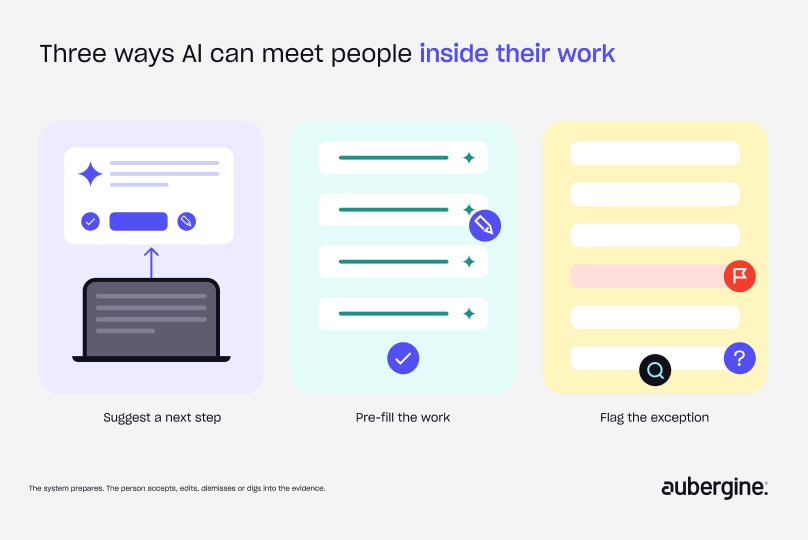
Suggested next step. We use it when the next move is known and the user only needs to approve it, like sending a follow-up after a call. The design choice is to make the suggestion small and dismissible, so it never blocks the work. The user can accept it, edit it, dismiss it or open "why this?" to see the meeting notes and deal stage behind it.
Pre-filled form or draft. We use it when the system can prepare content from information it already holds, like an opportunity update after a meeting. AI-filled fields look different from fields the user typed, and each carries its source. The user edits anything before saving, and nothing is submitted without them. Nexus, our internal platform, uses this pattern today for weekly project summaries, which we come to next.
Flagged exception. We use it when most items are routine and only a few need a person, like timesheet entries that don't match estimated effort. Each flag shows the reason and the evidence. The user can review the evidence, mark an item as expected, ask for context or escalate it.
Across all three, the system does the gathering and preparing, and the person keeps the judgment. That split decides whether people trust what the agent prepares.
Designing for AI agents in Nexus: what's live and what we're exploring
Nexus is Aubergine's internal platform for running the company. It brings our people, projects, clients and logged hours into one place, so leadership and teams can see who is doing what and how each project is going. It flags projects that need attention early and gives management weekly and company-wide reports, replacing scattered spreadsheets with a single source of truth.
What's live: weekly summaries that arrive where they're needed. Nexus uses AI to read the hours each team member logs and turn them into a clear weekly summary of the work done on a project. Nobody has to open a chatbot and ask it to summarize a project's week. The summary is prepared from data Nexus already holds and is ready when the team writes its client update. It saves the team time on those updates and keeps every summary consistent.
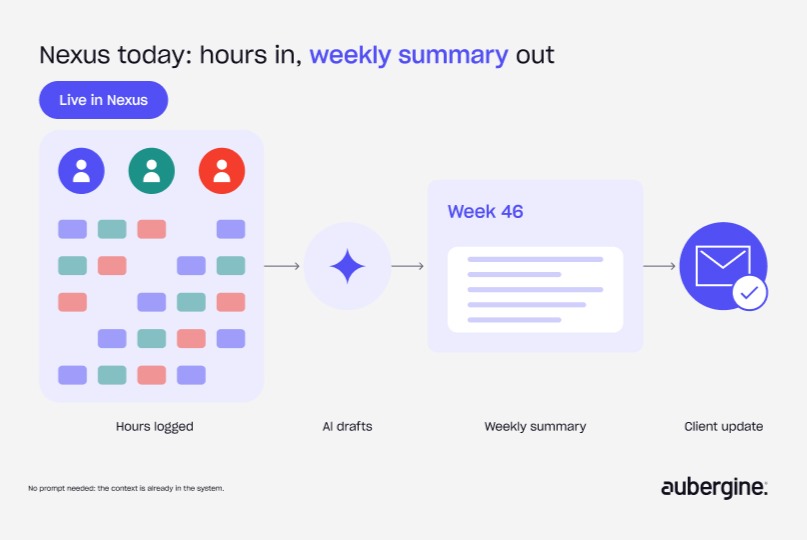
The AI does the gathering because the context is already in the system, and the person starts from a draft instead of a prompt. The caution from earlier applies too: a summary is only as accurate as the hours and descriptions people log.
What we're exploring: AI-assisted effort review. We've also explored how AI could help managers review project effort and overruns. This is a proposed workflow, compared with the manual process managers follow today:
A chatbot that answers questions about effort would still leave the manager to know what to ask, every week, for every project. The proposed design gives the manager an exception dashboard showing only the entries that need attention, the reason each was flagged, where each one stands and what they can do next: review it, mark it as expected, ask the employee or escalate it to billing review.
The employee needs something different. Their part is explaining why a task took longer, which is open-ended and hard to fit into a form. For them, a short conversation in Google Chat fits better: one specific question about one entry, with the answer sent back to the manager's dashboard. One agent, two interfaces. The right interface depends on the person and the task, not on the AI technology underneath.
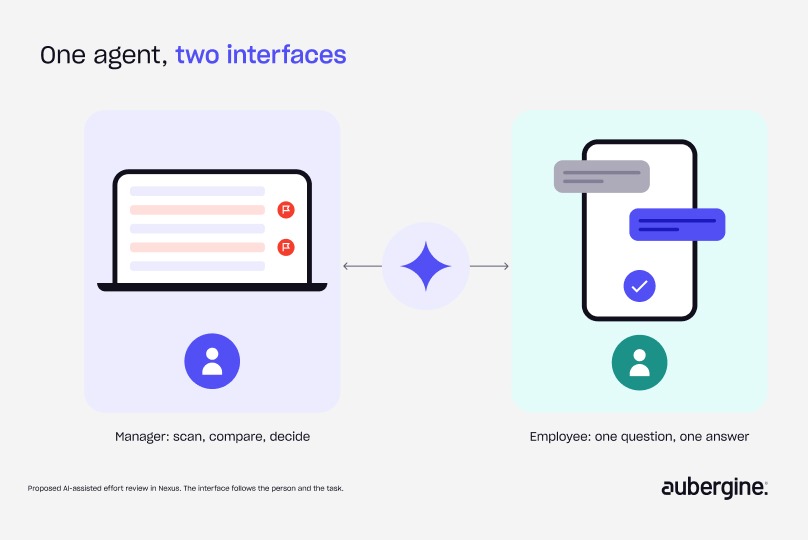
One workflow, end to end: what people see, what needs them, what they control
When people no longer perform every action themselves, visibility becomes a much bigger part of the experience. At every stage, the person should be able to answer three questions: what has happened, what needs my attention, and what control do I have? Here's how that plays out across one exception in the proposed Nexus effort review, from flag to decision:
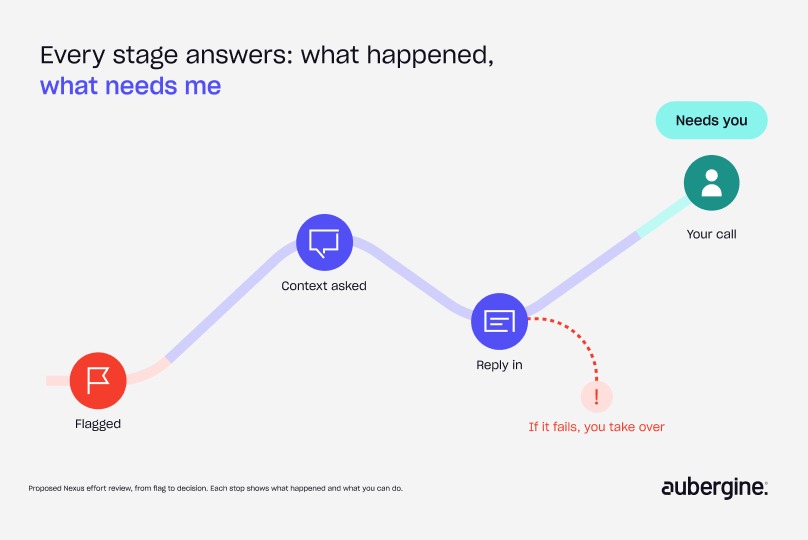
Two design decisions sit underneath the table. First, approvals follow risk. Human-in-the-loop shouldn't mean human-in-every-loop: ask people to approve routine actions and approvals become mechanical. In the proposed Nexus review, managers wouldn't review every entry, while billing and client-facing decisions would always get human review. Our blog on UX patterns that make AI agents trustworthy covers how to tier those checkpoints. Second, the hand-off is designed as its own moment, with the context attached, which we cover in teaching your RAG support chatbot to say "I don't know".
What workflow-first AI asks of the whole team
Neither approach is effortless. A chat interface that takes actions also needs integrations, permissions and careful action handling. What workflow-first AI adds is an investment in understanding the work itself, whoever ends up building it:
That discovery takes coordination between design, engineering and business teams.
When chat is the right interface for AI at work
Chat works well when people need flexibility, want to explore, or need to give context that doesn't fit a form. A starting point for each moment in a workflow:
Our blog on rethinking UX for AI and human collaboration covers where conversational interfaces earn their place.
Three questions before you add a chatbot to your ERP
When a CEO tells us they're adding a chatbot to their ERP, we ask three questions before anyone designs anything:
1. What problem are we actually solving? Are employees losing time finding information, entering data, resolving exceptions or waiting on approvals?
2. What does the system already know, and can the AI rely on it? If the ERP holds accurate records, rules and workflow context, the AI can prepare an action or flag something before anyone asks.
3. Where does the user need to step in? Which decisions can be automated, which need review and which need human judgment, and how will people know what the AI has done?
We used to design screens where people performed every action. Now we design experiences where AI takes on part of the work, and people guide, review or step in at the right moments. Agentic experience design is one of the eight disciplines in our AI 360 Compass, and it starts with working out which parts of the job actually need an interaction.
Run the prompt audit with your team
Take one workflow where your team uses, or plans to use, an AI chatbot, and fill in the worksheet below together. It takes about 30 minutes.
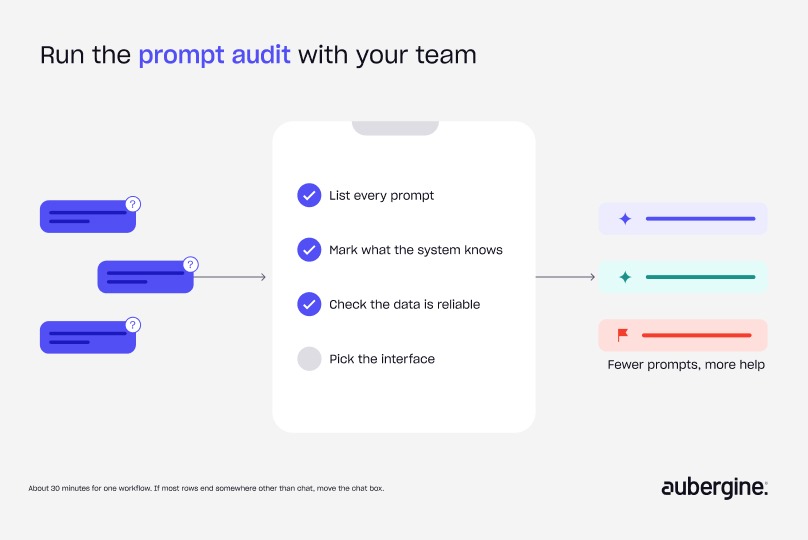
1. List every prompt a person has to write to finish the task.
2. Mark what the system already knows for each prompt.
3. Check whether the AI can rely on it: is that data accurate, complete and accessible?
4. Pick the interface for each step: suggested next step, pre-filled form, flagged exception, short conversation or chat.
If most rows end somewhere other than chat, the chat box is in the wrong place, and the rows marked "unreliable data" show you what to fix first.
Aubergine designs and builds agentic experiences that put AI inside the tools your teams already use, with status, approval and hand-off designed in. If you're about to add a chatbot to an internal tool, let's talk first.
FAQs
What is AI agent design?

AI agent design is the practice of deciding how people and AI agents share a task: what the agent does on its own, where its output appears, what it shows while it works, and when a person approves, corrects or takes over. Interface choice, including whether to use chat at all, is one part of it.
Should every AI feature at work have a chat interface?
No. Chat suits open-ended questions and exploration. For known, repeated tasks, a suggested action, a pre-filled form or a flagged exception usually gets the work done with less effort from the user.
How do users know what an AI agent is doing in the background?
Show the stages. A visible status for each step (running, waiting on someone, complete, failed) and a clear signal when a person's decision is needed keeps people informed without asking them to check in.
How many approvals should an AI agent ask for?
As few as the risk allows. Tie approvals to how consequential and reversible an action is. Asking people to approve routine actions trains them to click yes without reading, which removes the control the approval was meant to add.
Is building AI into an existing workflow more expensive than adding a chatbot?
Usually it takes more discovery, design and integration work up front. That cost buys a feature people use without having to learn how to prompt it, and it surfaces data and ownership questions a chatbot would leave unanswered.
Should AI suggestions live in Slack or Teams, or inside our own product?
Put them where the task gets finished. If the work completes in the CRM, a card in Slack should take the user straight to the right record or complete the action there, so nobody copies information between tools.
Can one AI system support both chat and in-workflow interfaces?
Yes, and many should. The same agent can surface exceptions on a dashboard for a manager, collect context from an employee through a short conversation and answer open-ended questions in chat.


Authors

Rupali Saini

More ways to listen


Podcast Transcript