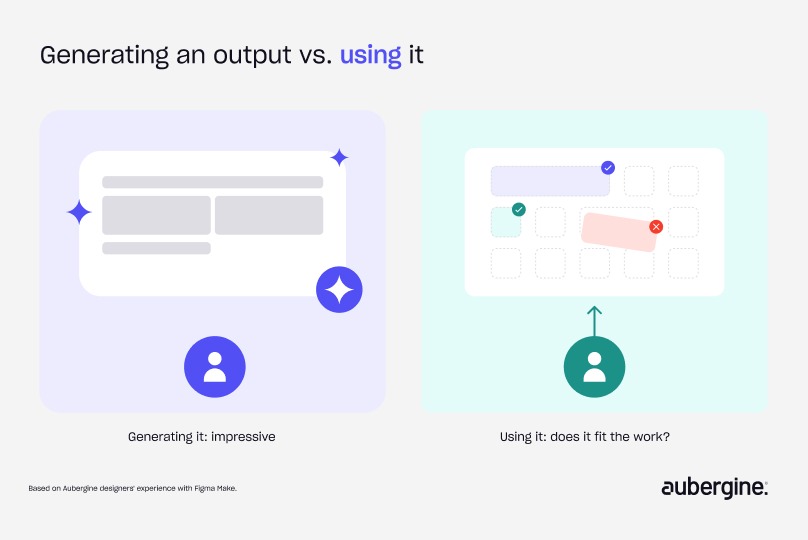
The first time our designers used Figma Make, a working interaction appeared in minutes. Generating it was the easy part, and it looked impressive.
Using it was the real test. Could a designer take that output into the design file, edit it precisely, apply our design system and hand it to a teammate? An interactive experience generated by AI isn't automatically a native, editable Figma prototype the rest of the process can build on. Where the output fit into the workflow, designers came back to the tool. Where it needed more work to rescue than to rebuild, they drifted back to their usual way of working.
That gap between generating an output and using it is where trust in AI at work gets decided. The first five minutes should show value. Trust grows when that value survives the next step of the work.
When employees don't use an AI tool the company rolled out, the usual diagnosis is a training or change-management problem. In our experience the cause is often simpler: employees stop using tools that ask for trust before they've shown any value.
The short answer: employees trust the AI tools that prove useful on their own work first. Test every internal AI tool against four stages: See it work on a real task, Try it inside the existing workflow, Control the output while working with it, and Undo a change or go back when something doesn't work.
Why training alone doesn't build trust in AI at work
We've been running internal AI learning initiatives at Aubergine. What we saw was that attending a training session didn't automatically turn into using AI regularly. Assignments stayed pending, and the blockers people raised were practical:
- Time, alongside existing project commitments
- Access to the right tools
- Clarity about what good use looks like
- Finding the right use cases in their own daily work
Large surveys show a similar plateau. BCG's 2025 survey of more than 10,600 workers found that regular AI use among frontline employees had stalled at 51%, and that 54% of respondents would use AI tools even if they weren't authorized. Training does help: regular use is sharply higher among employees who get at least five hours of it, especially in-person training and coaching. Leadership matters too. The share of employees who feel positive about generative AI rises from 15% to 55% with strong leadership support.
So we shifted toward smaller practical exercises built on actual design tasks, shared examples and working sessions. Training can introduce AI. Seeing it solve a real problem is what brings people back.
See, Try, Control, Undo: how a designer experiences an AI tool
We set out See, Try, Control and Undo in the first five minutes: why AI adoption starts with trust, written for customer-facing products. Internal tools face the same test with one difference: employees can't churn. They go back to the old way of working, and the tool stays licensed and unused.
Here's how the four stages play out for a designer using an AI tool to explore a new onboarding flow:
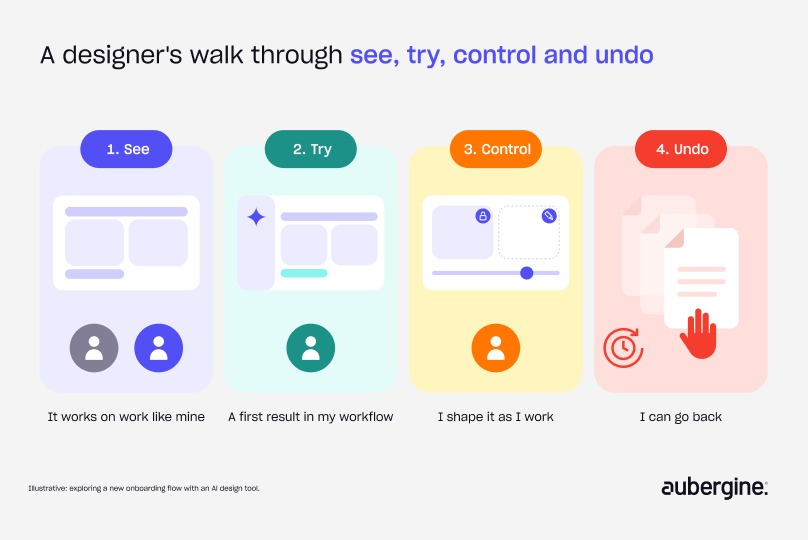
See: it works on work like mine. The designer sees the tool used on a real project from their own team, through a shared example or a working session. A polished demo on sample data proves the tool can generate. A teammate's real flow proves it can help with this kind of work.
Try: a first result inside my workflow. They generate a first direction from their own brief, in the tools they already use, without a new process or a long setup. Trust breaks here when the first attempt needs access requests and workarounds before it shows anything.
Control: I shape it while I work. They keep the parts that work, ask for changes to one section, swap in design-system components and edit specific elements directly. Control means steering the output during the work, so the output reflects their design intent.
Undo: I can go back when it doesn't work. A direction turns out wrong, or a change breaks something that was fine. They open version history, restore an earlier direction, reverse the last change, or fall back to building that part manually without losing what already works.
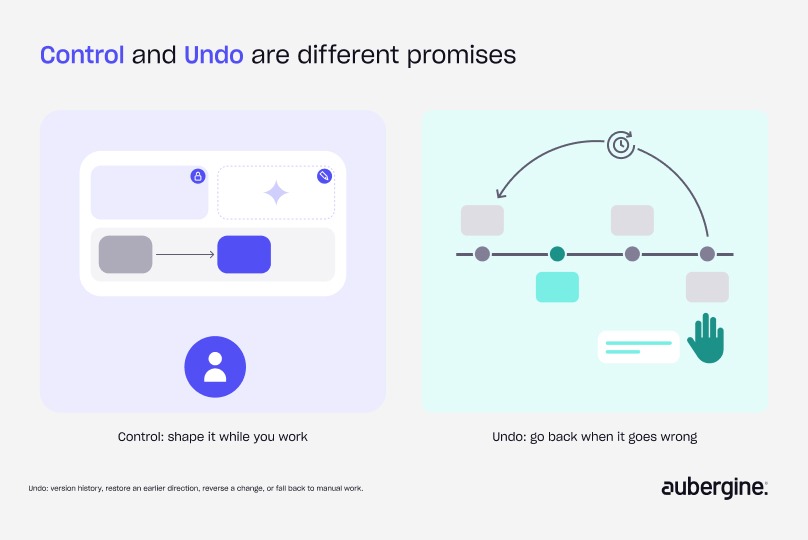
The difference matters. Control is shaping the output while you work with it. Undo is recovering when something goes wrong. A tool can offer plenty of control and still feel risky if there's no way back.
What changed in our own AI-assisted writing
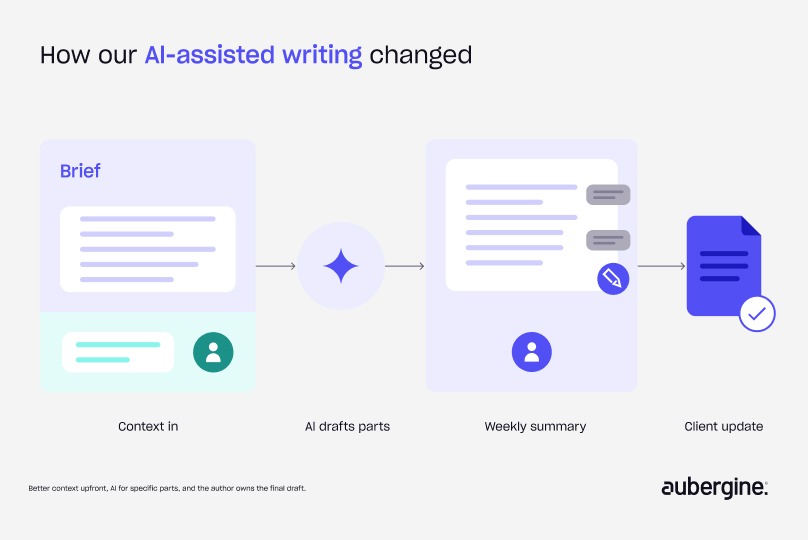
Our blog drafting is a good example of Control in practice. Early on, Claude produced drafts quickly, but they read as AI-written and needed another full round on tone and content. Speeding up generation didn't fix that. Changing the process did:
- Better context upfront: every draft now starts from a detailed brief with the search intent, the authors' own interview answers in their words, overlap guardrails against posts we've already published, and our brand and style rules
- The author owns the draft: authors review section by section and comment where something doesn't sound like them or overstates what happened, and those comments drive the revision
- AI for specific parts: AI helps with structure, research, source checking and first drafts, while the stories, opinions and final judgment come from the author
This post went through the same loop. The shift was from how quickly AI could produce a draft to how well the author could shape the final piece. People are more comfortable using AI when they know they can take the output forward in their own way.
Who resists AI tools, and what they're protecting
No single group resists AI the most. Experienced people tend to be the most critical, because they already know what good work looks like. For designers, generating ten screens quickly is useful, but someone still has to account for usability, edge cases, consistency and the design system.
What experienced designers protect is the quality of the outcome and their ability to make intentional design decisions. In our internal AI practice, AI is the starting point, and critique, iteration and quality checks stay with the designer. People won't trust AI because it's fast. They'll trust it when it helps them produce better work without lowering the bar.
Match review effort to the risk, not only the stage
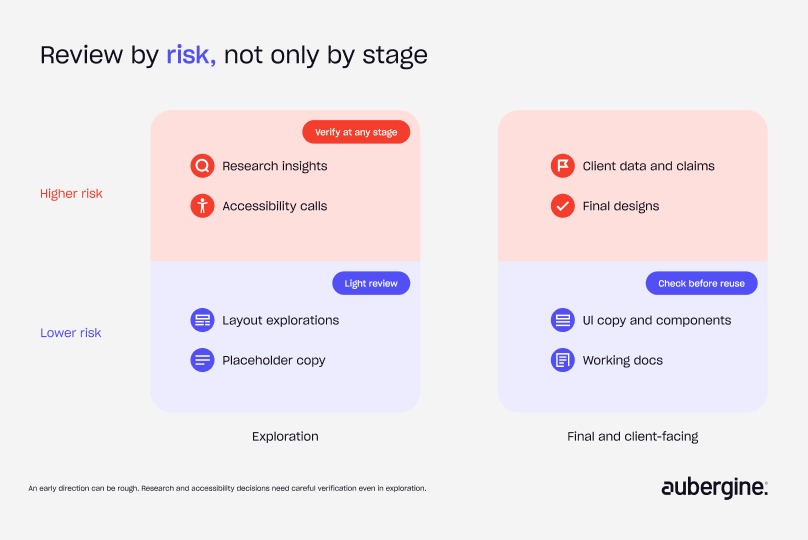
Reviewing everything AI produces can become a job of its own. Stage of work helps decide how much to review: an early design direction can be rough, and a client deliverable needs the highest care. Risk matters as much as stage. Some AI output needs careful verification even during exploration, because a mistake there quietly shapes every decision after it:
- Lower risk, light review: layout explorations, placeholder copy, mood directions
- Medium risk, check before reuse: UI copy, component choices, working documentation
- Higher risk at any stage, verify carefully: research insights and synthesis, accessibility decisions, data or claims that reach a client
Customer-facing agents need the same principle in a different form. Our post on UX patterns that make AI agents trustworthy covers how to set human-in-the-loop checkpoints by risk.
How to build trust in AI at work: three questions before the training day
When a CEO tells us they'll fix adoption with a training day, these are the questions we ask them to answer first:
1. What are employees actually using AI for today? Not how many have access, but which tasks they use it for, and whether those tasks got easier.
2. Where are they struggling? Is the output not good enough? Is the tool hard to fit into the existing workflow? Are people spending more time correcting output than they save?
3. What happens after the first successful experiment? Can employees use the output in their real work, shape it, recover when it goes wrong, and tell when to rely on AI and when to decide for themselves?
These answers say more about adoption than attendance at a training session. Training matters. It just shouldn't be the only plan.
Successful AI adoption looks like better judgment
There's a difference between being excited about AI and depending on it for work. A tool can produce something impressive in minutes and still not earn a place in anyone's day. The goal also isn't blind trust. A designer who knows when not to use AI may understand the technology better than someone who uses it for everything. Successful adoption is less about getting people to use AI more and more about helping them use it with better judgment.
Audit one internal AI tool this month
Pick one AI tool you've already rolled out and talk to five people who have access to it. Ask which task they use it for, when its output last went straight into their work, and what they had to redo. Then score the tool on See, Try, Control and Undo. The lowest score is where to spend your next adoption budget, before booking another training day.
Aubergine helps teams design AI tools and workflows that employees trust enough to keep using. If adoption has stalled after a rollout, let's talk.
FAQs
How do you build trust between humans and AI agents at work?

Let the agent prove itself on a real task first, then give people control over its output and a way to recover from mistakes. Trust builds when results hold up in the next step of the workflow, not when the first output looks impressive.
Why do employees stop using AI tools after the rollout?
Usually because the tool asked for effort or trust before it delivered value: setup, a new process, or output that needed heavy rework. People rarely announce it. They drift back to the way they worked before.
Is AI training a waste of money?
No. BCG found regular use is sharply higher among employees with at least five hours of training. Training works best when it's hands-on and built around employees' real tasks, rather than a demo of what the tool can do.
How should we measure AI adoption beyond licenses and logins?
Track which tasks people use AI for, how often its output goes into real work without heavy rework, and whether those tasks take less time. Logins show access. Those three show value.
Should employees trust AI output by default?
No. The goal is calibrated trust: people know which tasks the tool handles well, check output in proportion to the stakes, and feel free to skip AI when it isn't the right fit.
What should we do about employees using unapproved AI tools?
Treat it as a signal. BCG found 54% of workers would use AI tools even if they weren't authorized.1 If the approved tool doesn't fit their work, people will find one that does, so fix the fit as well as the policy.


Authors

Rupali Saini

More ways to listen


Podcast Transcript